
ERP, sales & costing software for the woven sack & packaging industry • Ahmedabad, India
Home / Features & Screens
Real screenshots • version 4.70 • light and dark • Windows and Android

Inside Nexora Sales & Costing — the key screens, straight off the PC and the phone

Nineteen screens from the installed desktop application, version 4.70, running real saved bags and sample enquiries: Nexora AI working from one sentence, the Marketing dashboard with the morning briefing, enquiries, customers and follow-ups, the weight calculation and its 3D view, raw-material prices, the process route, the costed Bill of Materials, the quotation, the ink model, Easy Cost and the Modules menu — and six from Nexora Mobile on Android. Every desktop screen carries its own light and dark rendering — flip any of them, or all at once. Click any screen to enlarge.

Show every screen in
✦ NEXORA AI • ONE SENTENCE

Say the bag and ask for the cost — Nexora AI shows the steps

“1L stitch bag, 490 × 550, single fold, 70 gram, 40×40, tape 80+20, give me the cost” — spoken or typed, in ગુજરાતી, हिन्दी or English, on any window.

  • Calculation, route or saved workflow, which part goes where, every stage’s recipe and waste, a check, the cost
  • “70 gram” is the target weight — the GSM is found by Nexora; a weight in grams always wins over a GSM
  • Nothing is done until you press Run; say “make it 75 gram” and the same bag changes
Nexora AI on the calculation window with the steps it will run, light theme Nexora AI on the calculation window with the steps it will run, dark theme
Click to enlarge
✦ NEXORA AI • RUN

One Run — weighed, routed, checked, costed

Every step is ticked or says why it stopped. The cost is the BOM’s own figure, worked out on your computer — Nexora AI never sees it, nor an item name or a customer.

  • It checks what it built before the cost: “is everything right?”
  • It learns from ALL your saved bags and BOMs — and from every change you make to what it did
  • It thinks like your technical manager: asks every open field of the structure, puts in the stages the bag needs (a 2L bag gets lamination) — and drafts the quotation
  • One conversation on every window; change the plan where it stands, move it, size it, make it small
Nexora AI after Run: the BOM checked and costed, light theme Nexora AI after Run: the BOM checked and costed, dark theme
Click to enlarge
✦ NEXORA AI • FILL THIS FORM

Or say the bag — or show a photo — and it fills the form

Speak or type the specification in ગુજરાતી, हिन्दी or English, or show a photo, a drawing or a PDF. What was heard is shown; what is missing is asked.

  • Construction, size, GSM, mesh, BOPP and bag quantity, placed on your own constructions and fields
  • A dropdown where a field has options, a box where it is a number
  • The engine weighs it as ever — nothing is saved until you save
Nexora AI filling a calculation from a spoken specification, light theme Nexora AI filling a calculation from a spoken specification, dark theme
Click to enlarge
✦ NEXORA AI • BOM CHECK

It reads a BOM and says what to fix

Stages, sources, recipes and waste, read in plain words — with a link to the stage. It never sees the cost of a bag.

  • A stage taking the wrong material, a recipe that does not add up, a waste that looks wrong
  • In English, ગુજરાતી or हिन्दी — it answers in the language you use
  • It changes nothing: every figure is still the engine’s
Nexora AI checking a BOM, answering in Gujarati, light theme Nexora AI checking a BOM, answering in Gujarati, dark theme
Click to enlarge
FEATURE 01 • DASHBOARD

It tells you what is wrong before you ask

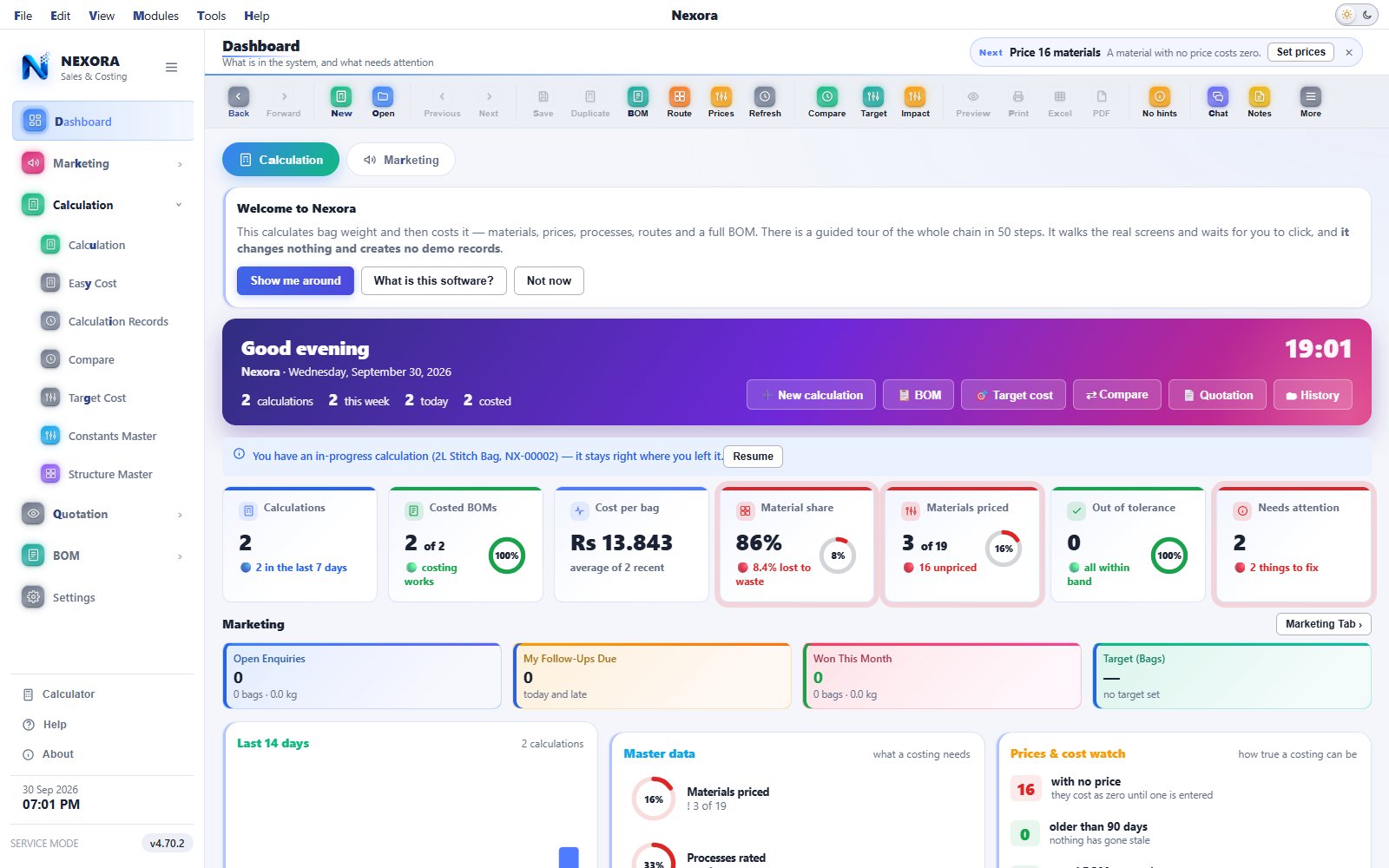
The first screen is a to-do list, not a welcome page. The Dashboard has two tabs, Calculation and Marketing; the Calculation tab puts live figures across the top, then everything the data says needs fixing, each with a button that takes you straight there.
  • Cost per bag, material share and out-of-tolerance bags across every recent calculation
  • "Needs attention" flags materials with no price, processes with no rate, constructions with no route
  • A Marketing strip — open enquiries, your follow-ups due, won this month, the bags target — with the Marketing tab one click away
  • The last fourteen days, what the masters still need, and prices that have gone stale
Nexora Sales & Costing Dashboard, Calculation tab, light theme Nexora Sales & Costing Dashboard, Calculation tab, dark theme
Click to enlarge
FEATURE 02 • MARKETING DASHBOARD & MORNING BRIEFING

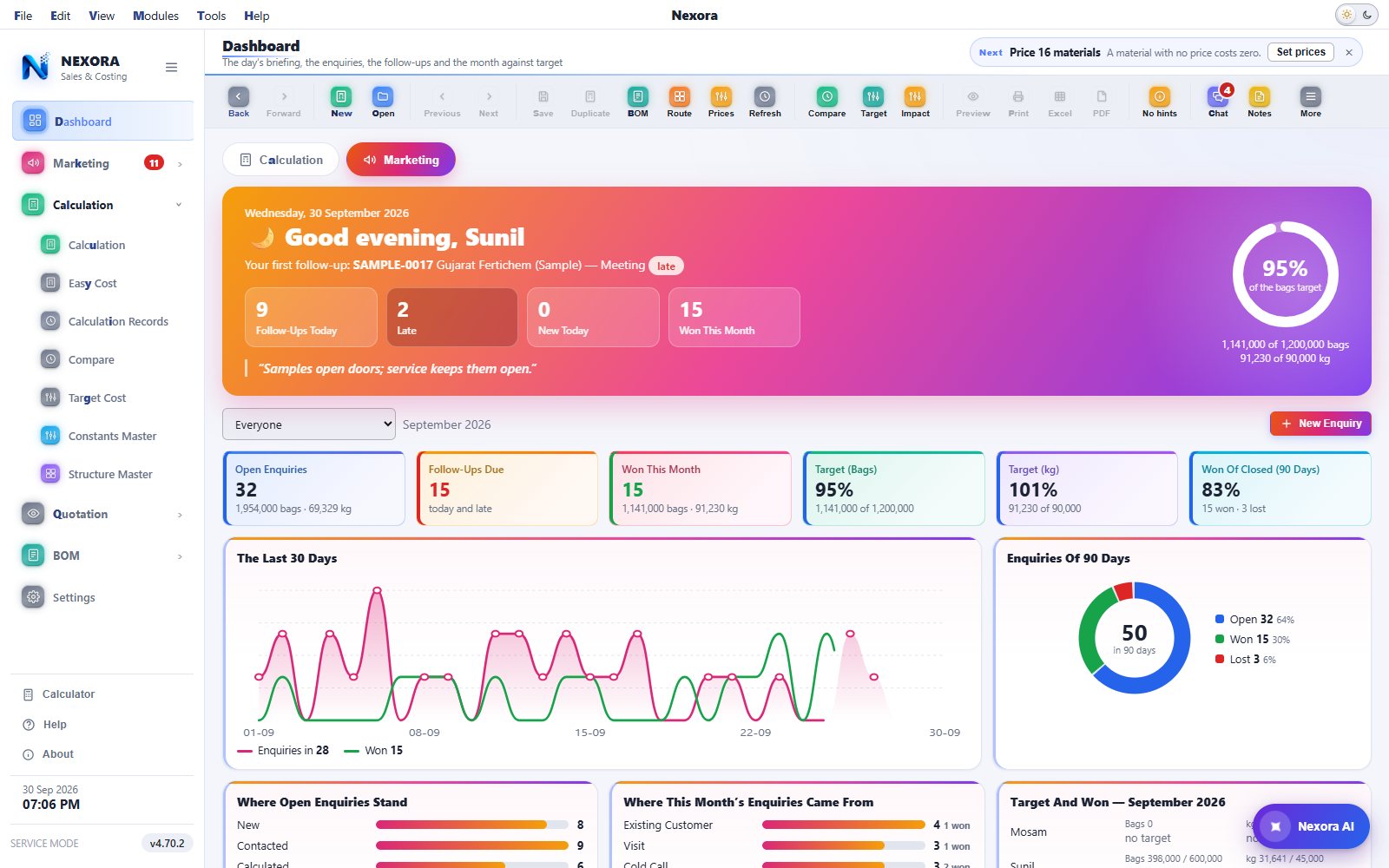
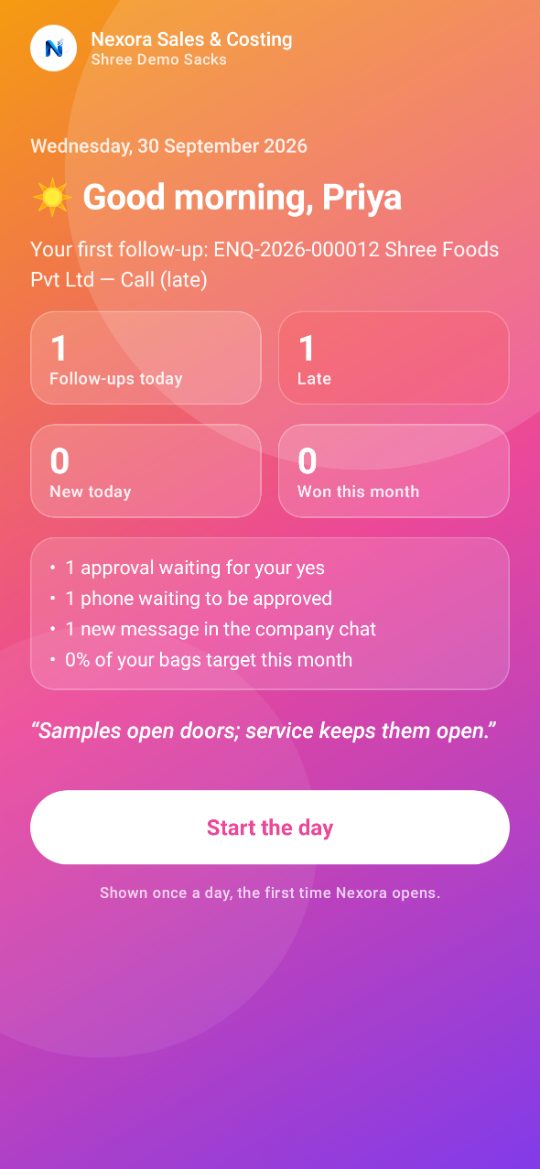
The day’s briefing, before the first call

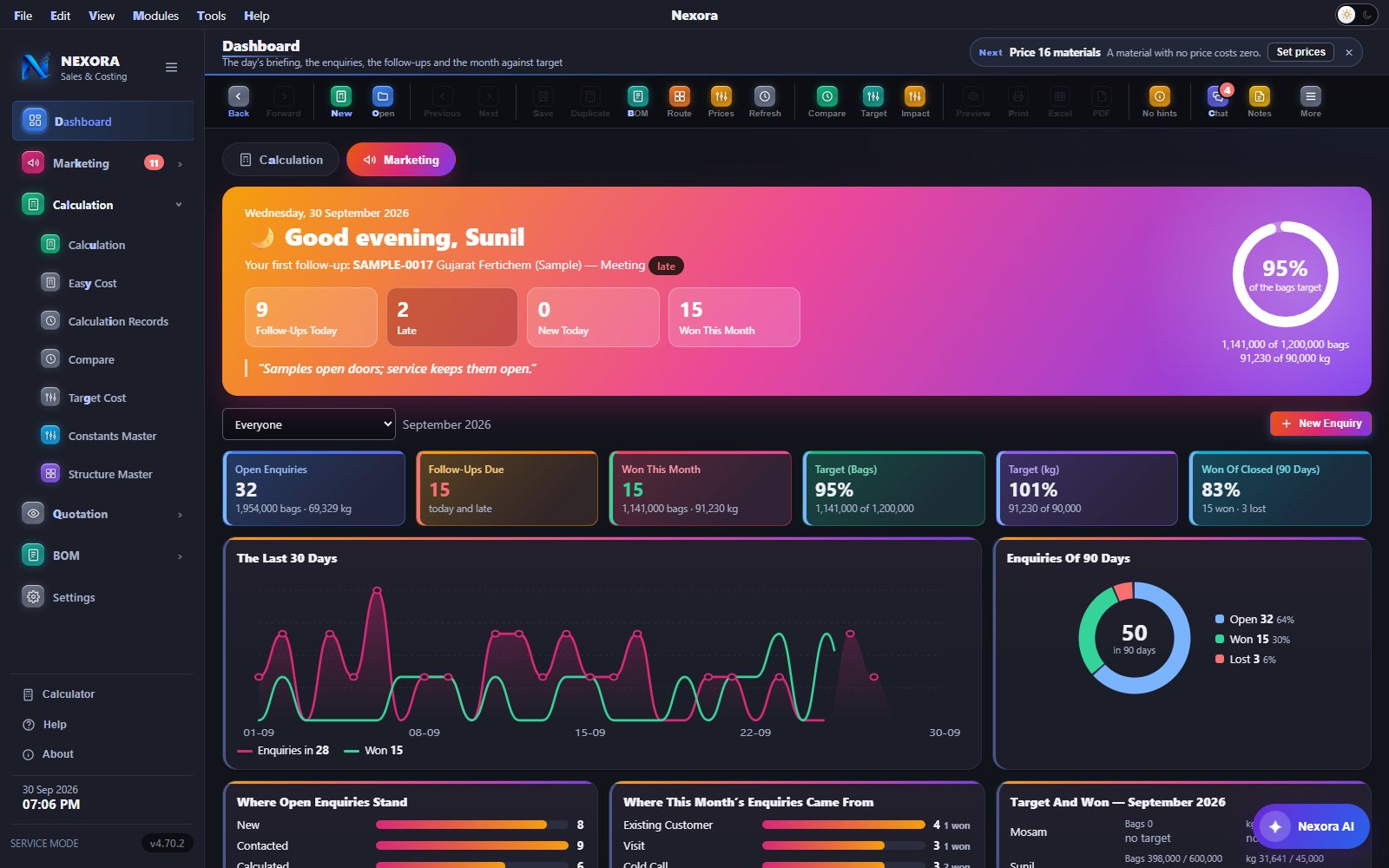
The Marketing tab opens on a sunrise-coloured card: a greeting by name, the first follow-up of the day, and four counts — follow-ups today, late, new today and won this month — with a line for the day and a ring showing the month against target.

  • Tiles, each in its own colour: open enquiries, follow-ups due, won this month, the bags and kilogram targets, and won of closed over 90 days
  • Charts that draw themselves: the last 30 days of enquiries against orders won, where open enquiries stand, where this month’s came from, and target against won for each person
  • Everyone you are allowed to see, or one person at a time
Dashboard, Marketing tab: the morning briefing card, the tiles and the charts, light theme Dashboard, Marketing tab: the morning briefing card, the tiles and the charts, dark theme
Click to enlarge
FEATURE 03 • ENQUIRY RECORDS

Every enquiry — whose it is, where it stands, when it is followed up next

One buyer, one requirement, one number. The register lists every enquiry with its customer, source, the person it is assigned to, bags and kilograms, its status and the next follow-up; the ones due today or late are marked.

  • Tiles for open enquiries, follow-ups today, follow-ups overdue and won this month
  • Search and filter by status, person, source and dates; one click for Follow-Up Due, Mine or This Month
  • Statuses from New and Contacted through Calculated, Quoted and Negotiation to Won or Lost
  • Excel export, for administrators only
Enquiry Records: tiles, filters, statuses and the next follow-up of every enquiry, light theme Enquiry Records: tiles, filters, statuses and the next follow-up of every enquiry, dark theme
Click to enlarge
FEATURE 04 • ONE ENQUIRY

One buyer, one requirement — calculated, quoted and followed up until it is won

The date, status, source, the person it is assigned to and the next follow-up sit at the top. Below them the customer, with the contact person and the address picked from its own lists, and then the requirement — one line per bag, each linked to a saved calculation or calculated on the spot.

  • Make Quotation turns the requirement into a quotation, and the quotation is listed on the enquiry
  • Follow-Up writes down a call, a visit or a message, and when to follow up next
  • WhatsApp, Won, Lost and Print from the top of the window
One enquiry: customer, contact person, address, requirement lines linked to calculations, and Make Quotation, light theme One enquiry: customer, contact person, address, requirement lines linked to calculations, and Make Quotation, dark theme
Click to enlarge
FEATURE 05 • CUSTOMERS

Customers with their people, their addresses and their sub companies

A customer keeps as many contacts and addresses as it has, and its sub companies sit beneath it. Every row shows the main contact, phone, city, how many enquiries it has and who looks after it — with New Enquiry and Edit on the row itself.

  • Type a customer somebody else already has and Nexora says so at once
  • Import from Excel, with a ready template
  • Search by name, phone, city or GSTIN
Customers with contacts, addresses, sub companies and New Enquiry on each row, light theme Customers with contacts, addresses, sub companies and New Enquiry on each row, dark theme
Click to enlarge
FEATURE 06 • FOLLOW-UPS

Who to call, visit or message today — the late ones first

Overdue, today and the next seven days, each with the enquiry, the customer and phone, what is planned, who it is assigned to and what was said last time. Done… on the row writes down what happened and when to follow up next.

  • Tiles for overdue, today, the next seven days, enquiries with no follow-up date, and follow-ups written today
  • WhatsApp and Open on every row
  • Work done per person, and monthly targets in bags and kilograms, counted on won enquiries only
Follow-Ups: overdue, today and the next seven days, with Done, WhatsApp and Open on each row, light theme Follow-Ups: overdue, today and the next seven days, with Done, WhatsApp and Open on each row, dark theme
Click to enlarge
FEATURE 07 • WEIGHT CALCULATION

Every gram traced back to the formula that produced it

Pick the construction, type the size and the GSM, and the bag is weighed as you type — body, patches, valve, handle, liner, yarn — with the full traceability chain beside it: cut length, area, denier, UL and LAMI GPM.

  • Component-wise breakdown with each part's share of the bag
  • Target weight, tolerance band and variance, live
  • The Documents line links the calculation to its BOM and its quotations — one number system, like an ERP
Nexora weight calculation window, light theme Nexora weight calculation window, dark theme
Click to enlarge
FEATURE 08 • 3D BAG VIEW

The bag drawn, turned and taken apart

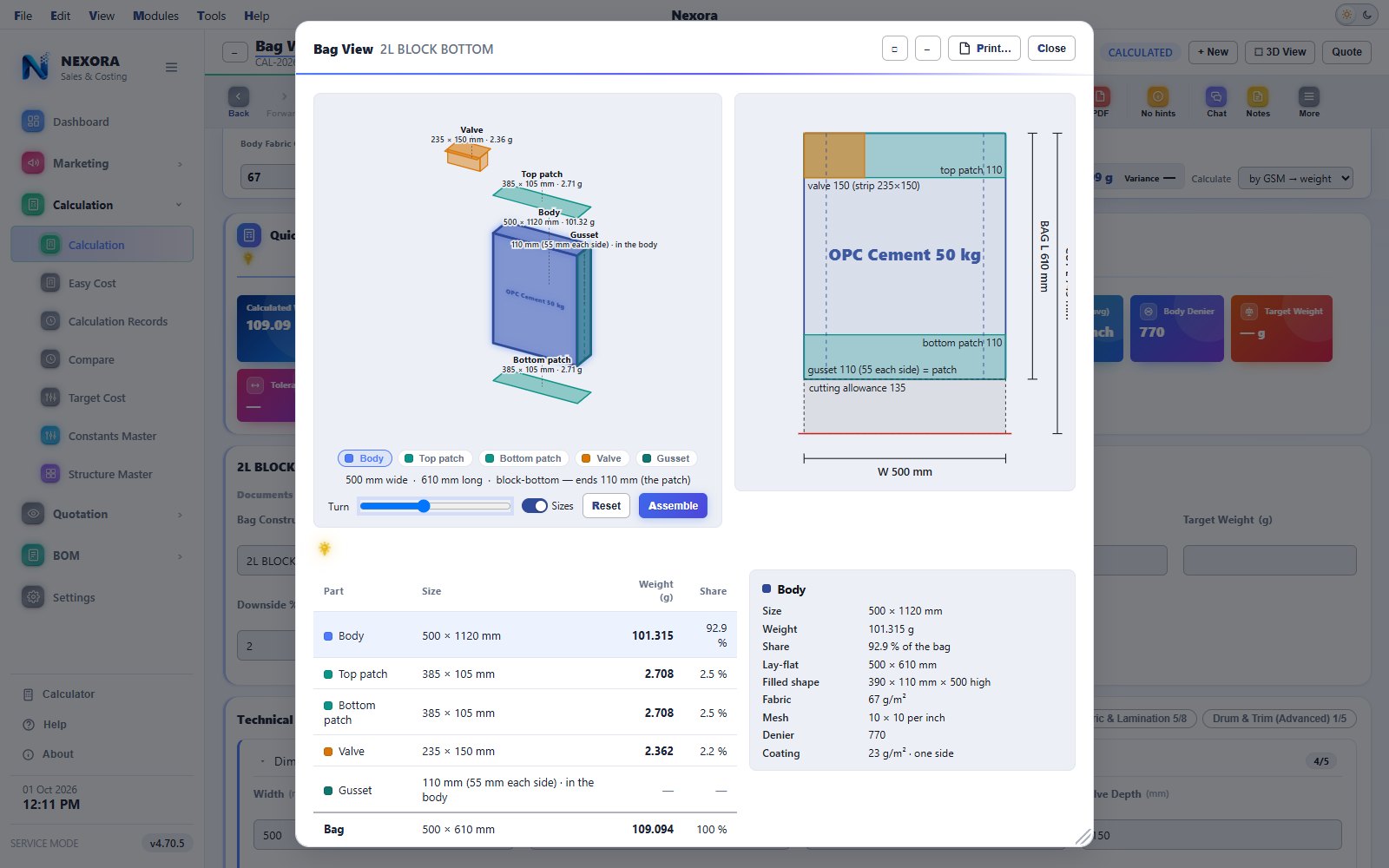
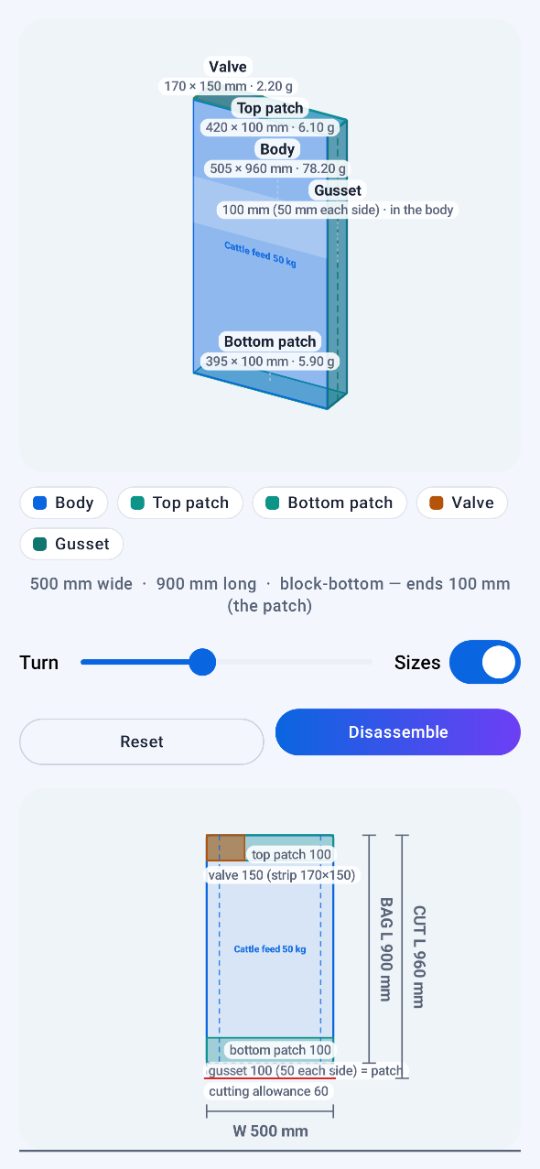
Nexora draws the construction your specification describes, prints the item name on its face, and lets you pull it apart part by part — each one carrying its own size, weight and share.

  • Body, patches, valve, handle, liner, yarn, easy-open tape and back seam, each in its own colour
  • A dimensioned lay-flat view beside it, to scale, so a cutting size is checked before the loom runs
  • Turn, disassemble, print — and the same view on the phone
Nexora 3D bag view, light theme Nexora 3D bag view, dark theme
Click to enlarge
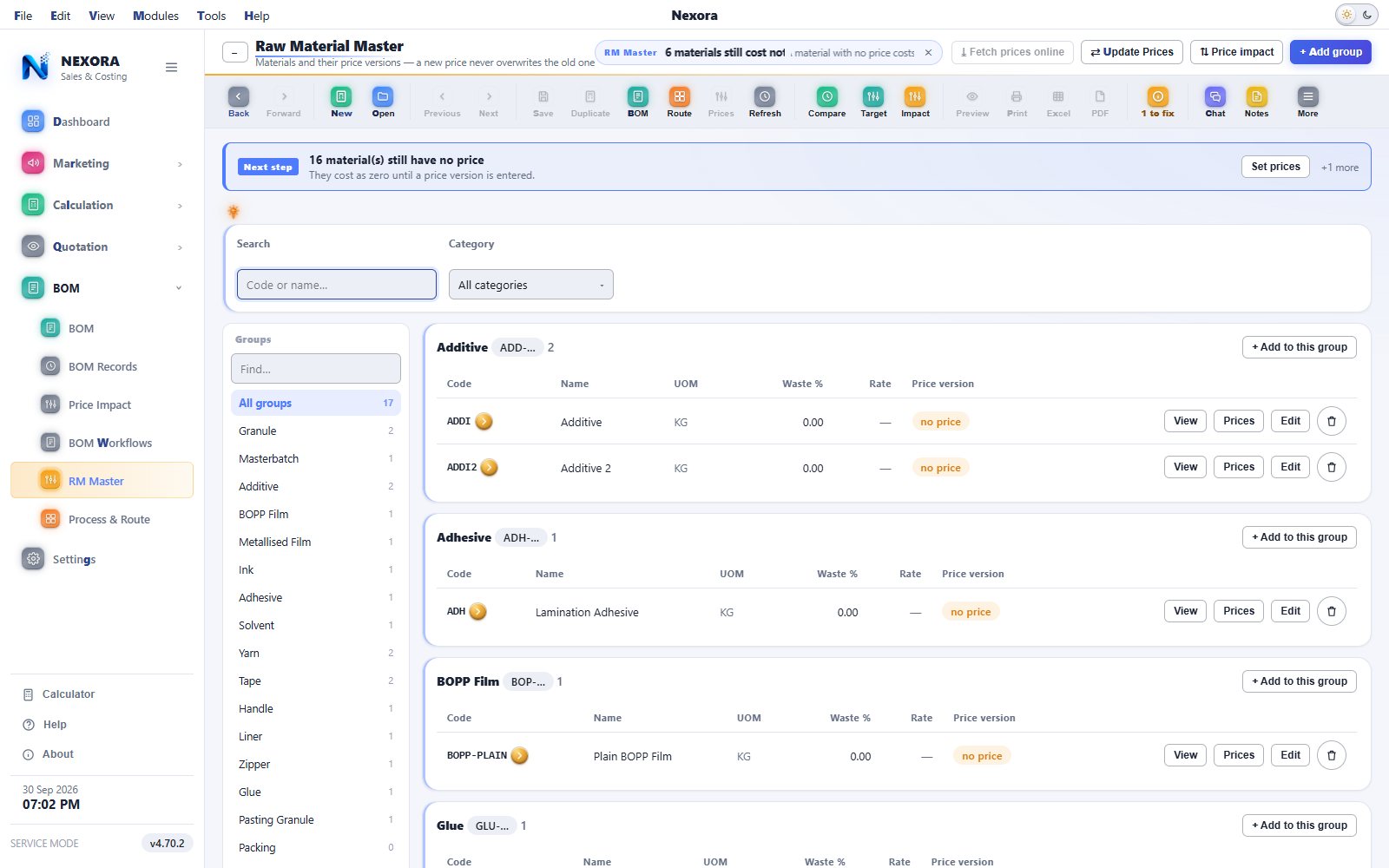
FEATURE 09 • RM MASTER & PRICE TRACKING

A new price never overwrites the old one

Materials sit in groups — granule, masterbatch, BOPP film, ink, handle — and each keeps a versioned price history with effective-from dates, so a resin rate change can never silently rewrite a costed batch.

  • Price versions with effective-from dates and notes; the rate on any date is the newest not in the future
  • Fetch a published polymer price list online, or paste one in like a spreadsheet
  • "Used in" shows every route and step that consumes the material
Nexora RM master with price versions, light theme Nexora RM master with price versions, dark theme
Click to enlarge
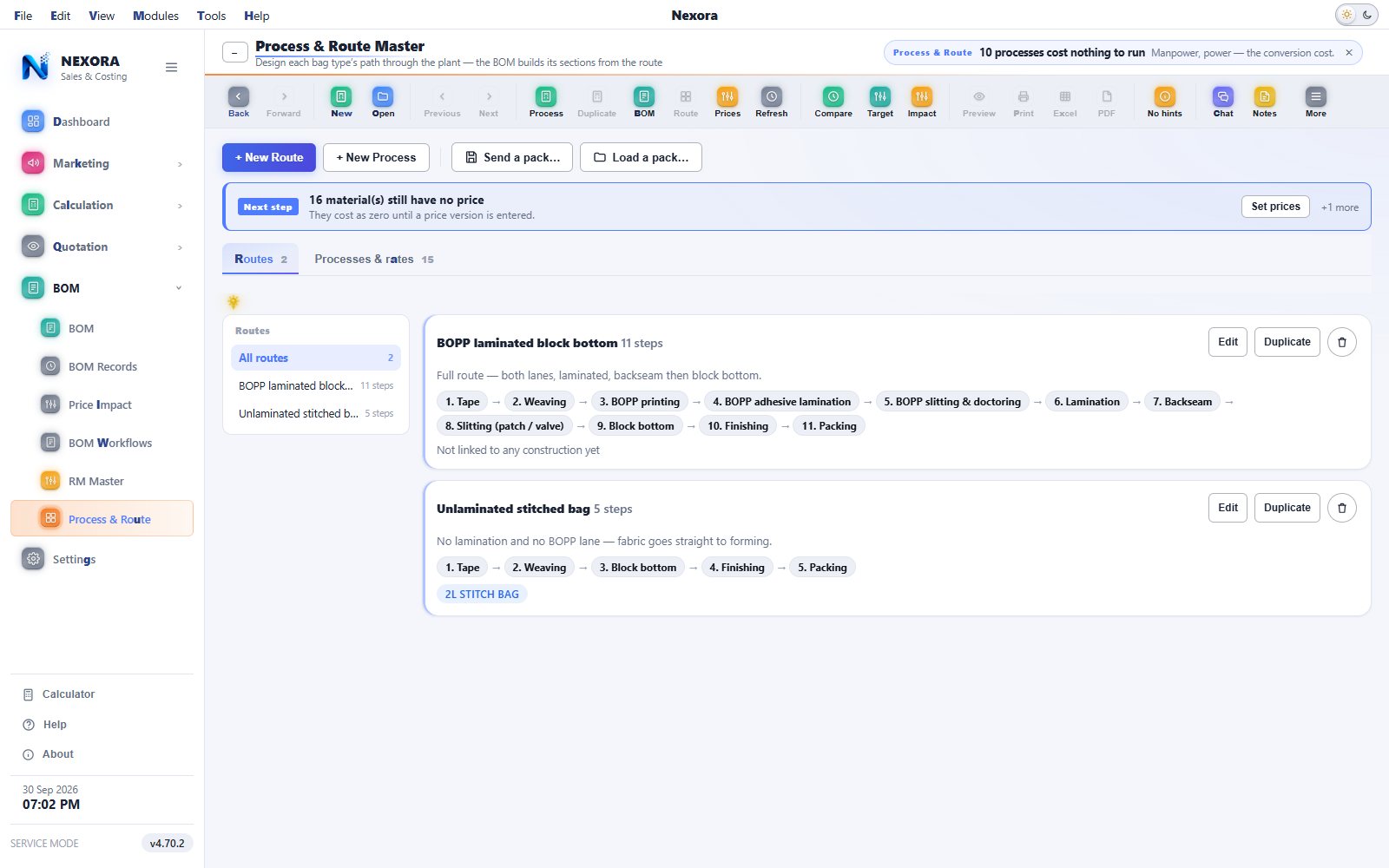
FEATURE 10 • PROCESS & ROUTE

Each bag type’s path through the plant, as the plant runs it

A route is the processes a bag passes through, in order — tape, weaving, printing, lamination, backseam, slitting, block bottom, finishing, packing. The BOM builds its sections from the route, and each process carries its own resource rates as cost per kilogram.

  • A bag that skips lamination is simply a shorter route, not a code change
  • Duplicate a route and change a step; link it to the constructions that run it
  • Processes with no rate are named at the top, because they cost nothing to run until one is entered
The Process & Route Master with two routes and their steps in order, light theme The Process & Route Master with two routes and their steps in order, dark theme
Click to enlarge
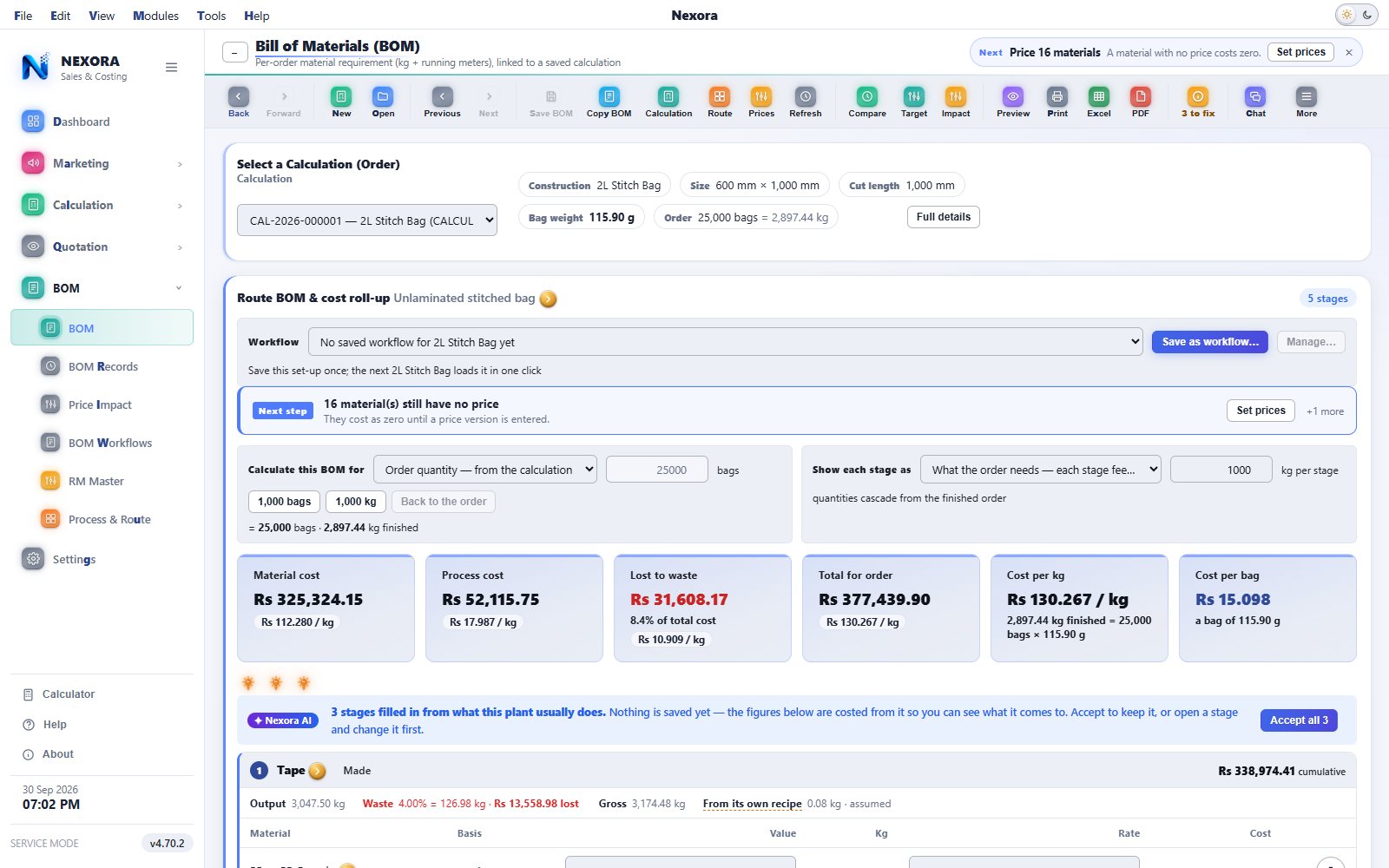
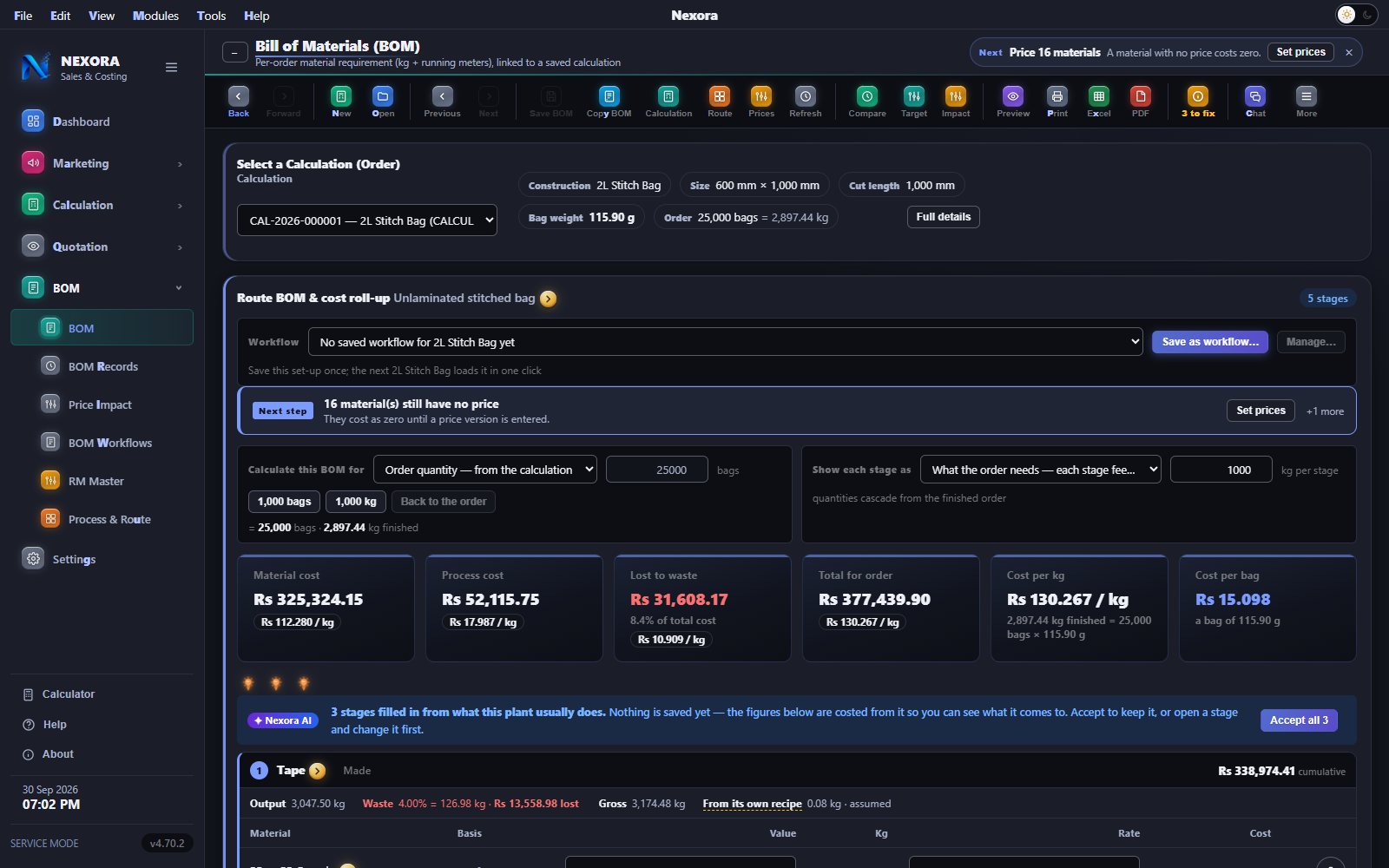
FEATURE 11 • COSTED BILL OF MATERIALS

Material, conversion, waste — reconciled to the rupee

Pick a saved calculation and the BOM costs it stage by stage along its route: kilograms and running metres per material, waste at every step, conversion cost from the resource rates, and the cost per bag the quotation will stand on.

  • The costed list's total always equals the roll-up's total — if it ever did not, the card would say so in red
  • Save the set-up as a workflow and the next bag of that type loads it in one click
  • Every saved BOM has its own number; the register below lists them all with their cost per bag
Nexora costed BOM, light theme Nexora costed BOM, dark theme
Click to enlarge
FEATURE 12 • QUOTATION

A price for a buyer — one row per bag, nothing of your cost on it

Pick the saved calculations, quote per bag, per thousand or per kilogram, add freight and packing, choose GST within or outside the state, tick the terms — and Nexora does the arithmetic. Your cost per bag is on screen while you quote and never on the sheet.

  • Numbered on save under your own document series (QT-2026-000001, or whatever your plant uses)
  • Linked to the calculation and the BOM it stands on — the Documents line shows all three
  • Made from an enquiry in one click, or on its own; terms and conditions written once, ticked per quotation
Nexora quotation window, light theme Nexora quotation window, dark theme
Click to enlarge
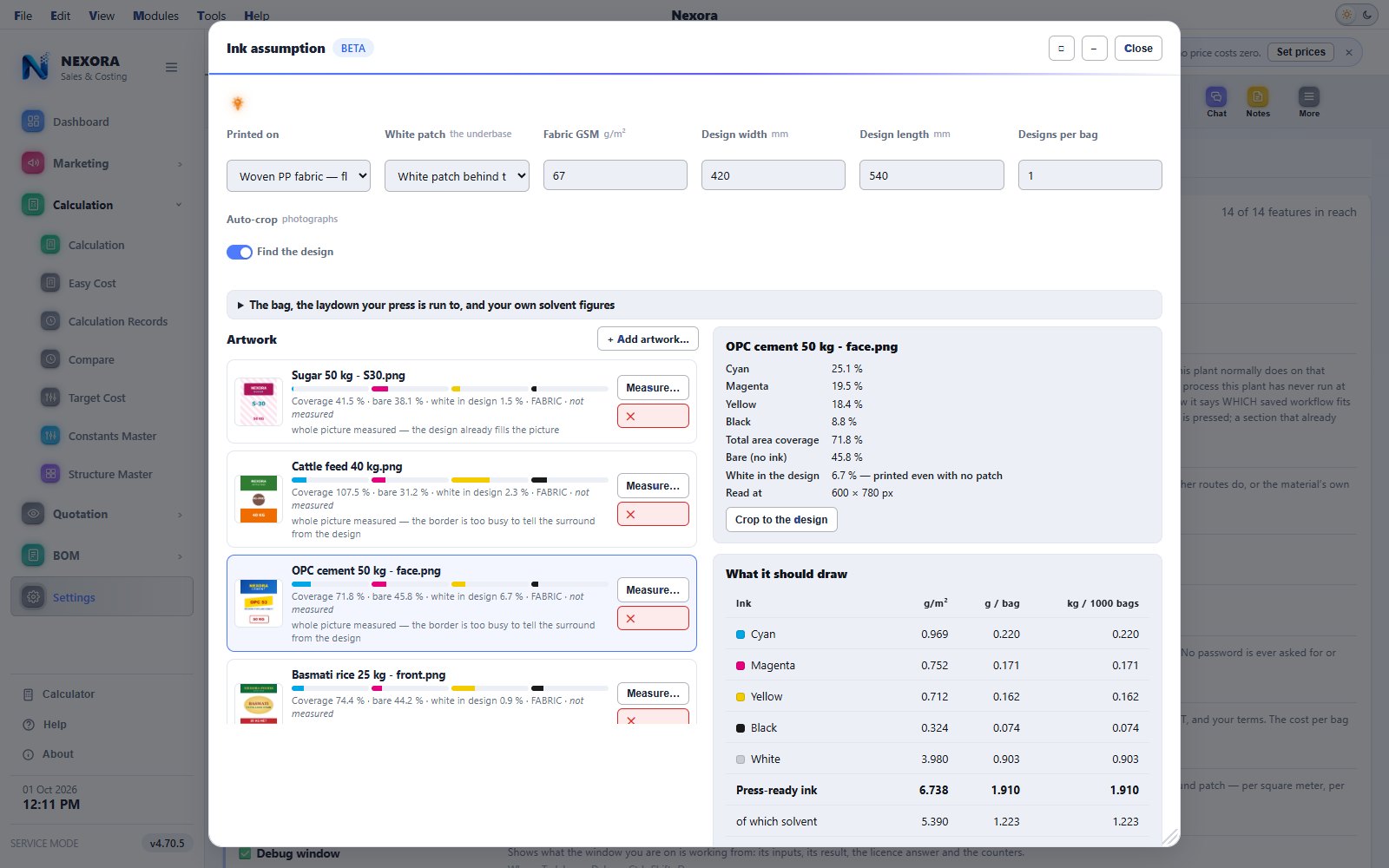
FEATURE 13 • INK ASSUMPTION (BETA)

It reads your artwork and says what a job will draw

Give it the artwork you print. The studio measures how much of the sheet each ink covers and estimates what the job should draw — cyan, magenta, yellow, black and the white patch — for the substrate, the faces printed and the bag size.

  • Trained on what jobs actually drew: tell it the real figure and the model tightens
  • Feeds the printing section of the BOM as an assumption, marked as one
Nexora ink assumption studio, light theme Nexora ink assumption studio, dark theme
Click to enlarge
FEATURE 14 • EASY COST

A price in ten seconds, for the buyer who is on the phone

Six choices and a rupee figure, on the trade’s own gram. It is a demo for a quick look with no accuracy guaranteed — the real cost comes from the construction, the route, the recipes and your own dated prices — and the window says so on its face.

  • Seventy-one rates, all editable, all arriving as round samples rather than a price list
  • Linked to nothing: no route, no BOM, no saved calculation, and nothing typed in it is kept
Easy Cost calculator, light theme Easy Cost calculator, dark theme
Click to enlarge
FEATURE 15 • KEYBOARD & MODULES MENU

The keyboard, the way SAP Business One users work

A Modules menu on the menu line opens every module group onto its windows. Every action, tab and window has one letter in bold: press Alt and the letter, or Alt and then the letters one after another — Alt, M, C, R opens Calculation Records.

  • The access letter is bold in the theme colour, not underlined, and never used twice on the same window
  • The arrow keys work in every menu
  • The mouse still does everything; the keys are for people who type all day
The Modules menu open on Calculation, each window with its bold access letter, light theme The Modules menu open on Calculation, each window with its bold access letter, dark theme
Click to enlarge
NEXORA MOBILE • ANDROID

Nexora Sales & Costing on the phone, for the people away from the desk

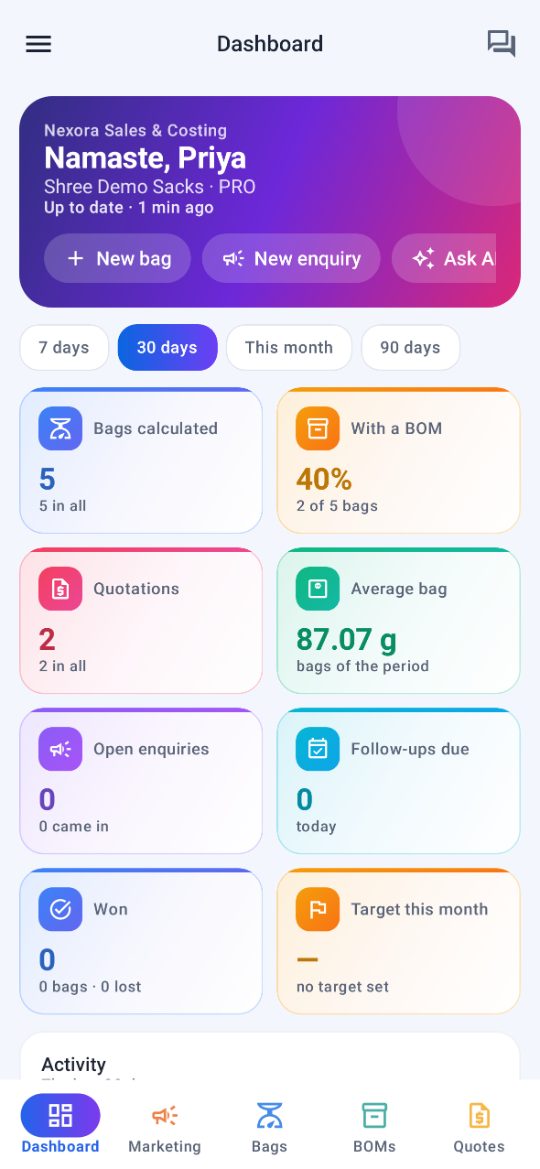
The Android app carries the dashboard, Marketing, bag calculations, BOMs, quotations and Nexora AI to the people who are out with buyers or on the floor, with the company chat beside them.

  • A dashboard with tiles and charts, and a morning briefing on the first opening of the day
  • Marketing: enquiries, customers, and follow-ups with call, WhatsApp or SMS and a reminder
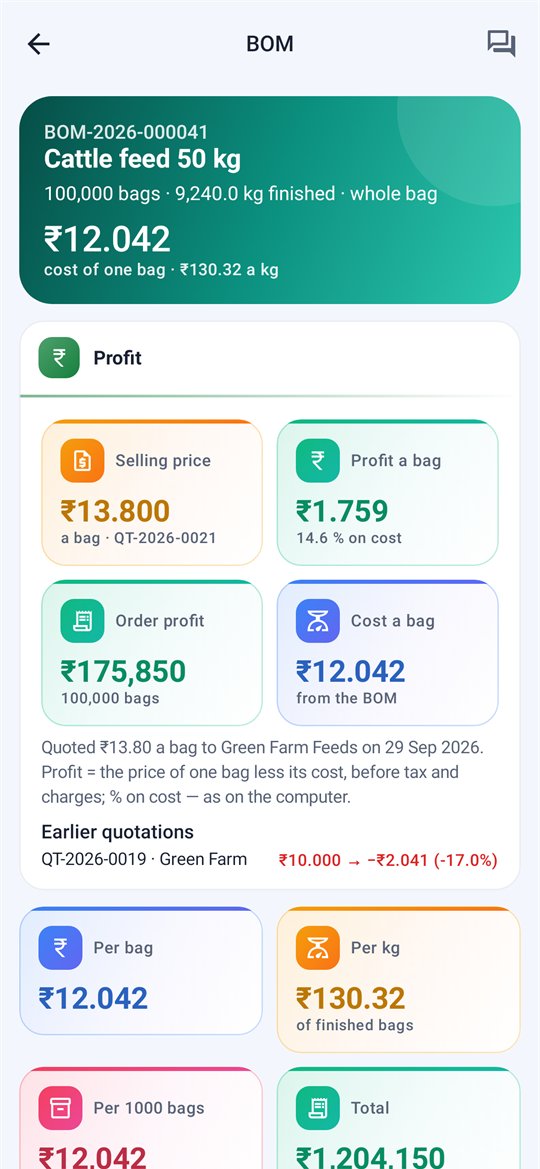
  • BOMs in full with the 3D bag view, a bag’s cost and the profit its quotation makes; quotations as a PDF to WhatsApp
  • Nexora AI, the company chat with search, and quick alerts
  • For the administrator: approve each phone, and set the users and the features they get
Nexora Mobile dashboard: tiles for bags, BOMs, quotations, enquiries, follow-ups, won and the month's target
Dashboard
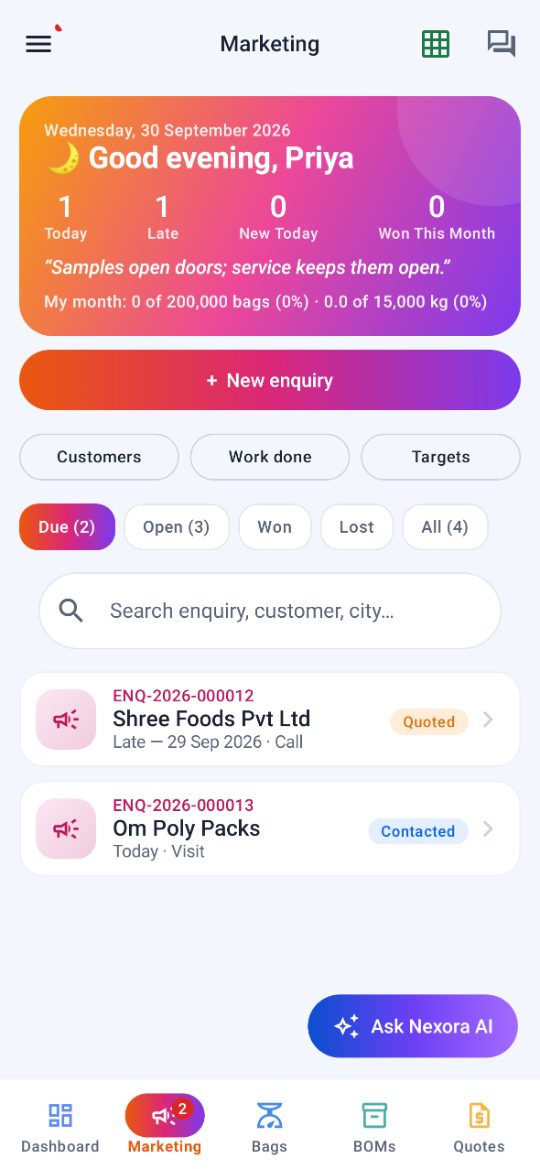
Nexora Mobile Marketing: the day's card, New enquiry, and the enquiries due
Marketing
Nexora Mobile morning briefing: follow-ups today, late, new today, won this month, and what is waiting
Morning briefing
Nexora Mobile BOM: cost of one bag, the selling price from its quotation, the profit a bag and on the order
BOM, cost & profit
Nexora Mobile 3D bag view of a block bottom bag with every part sized, and the lay-flat view
3D bag view
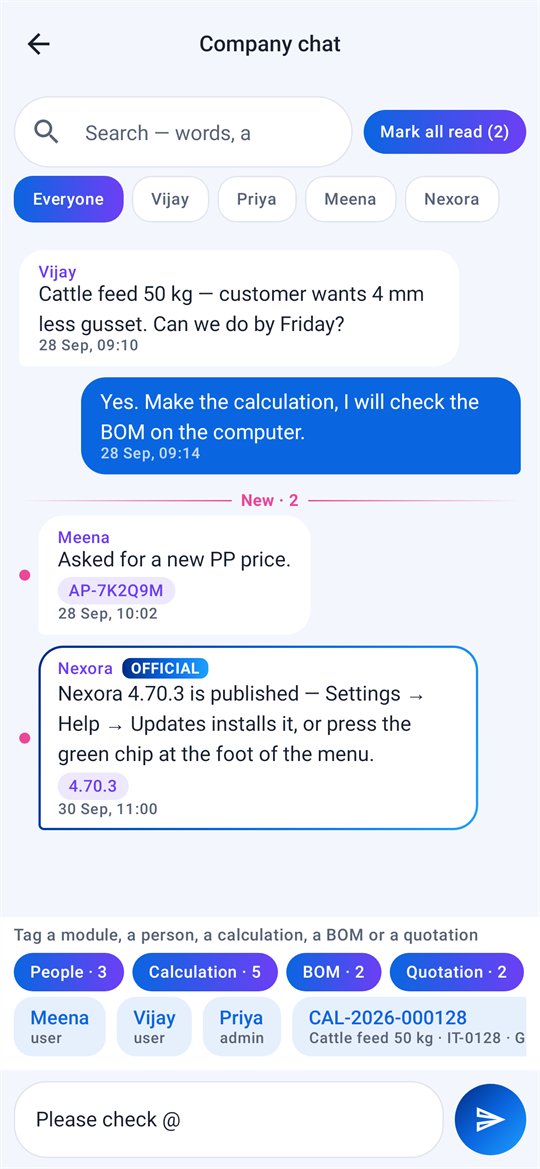
Nexora Mobile company chat: @ offers the modules — people, calculation, BOM, quotation — and a notice from Nexora marked official
Company chat & @
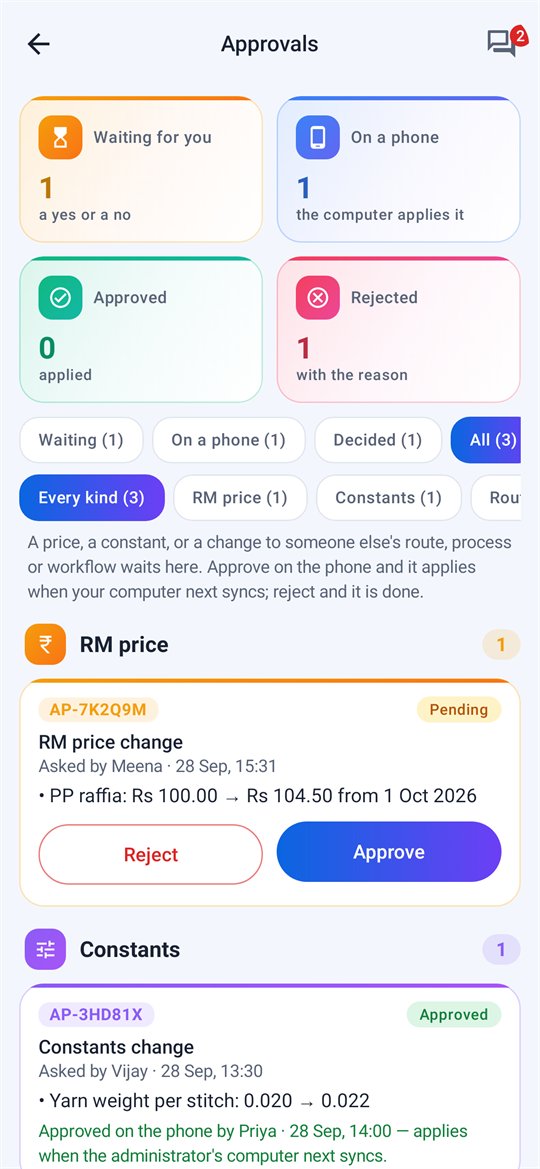
Nexora Mobile approvals grouped by kind, with waiting, approved on a phone, approved and rejected
Approvals by kind
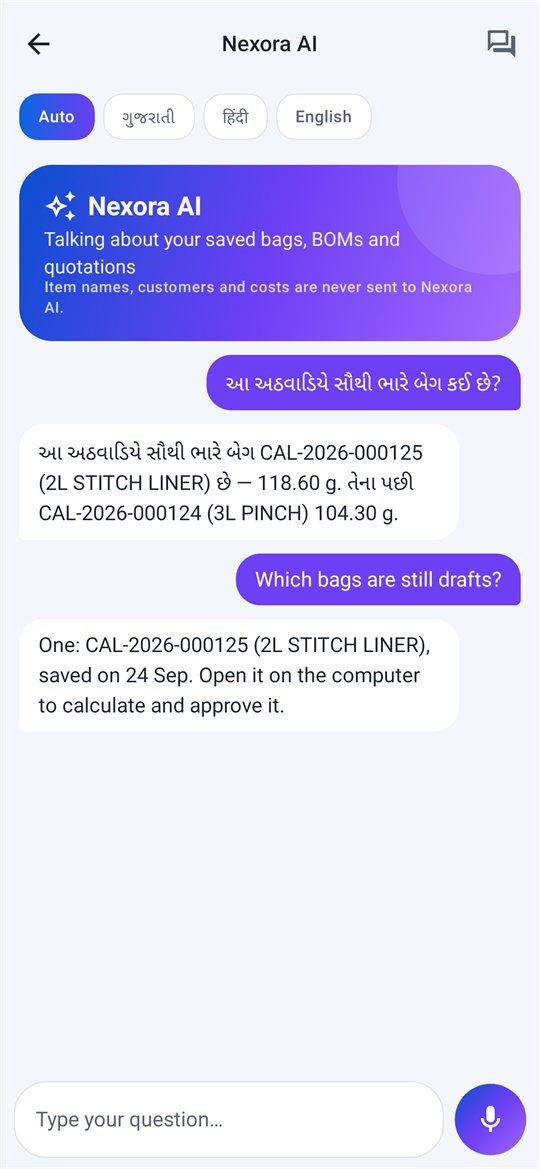
Nexora AI on the phone, answering a question asked in Gujarati
Nexora AI

Click any phone screen to enlarge.

See it on your own bags

A demo runs on your PC with your constructions, your materials and your prices — nothing leaves the plant.