

Every roll, from the loom to the lorry
A woven fabric plant loses rolls in the gap between the loom and the godown — read on a slip, cut without a number, weighed on a scale nobody wrote down, stacked somewhere and found two months later. Nexora Fabric Inventory closes that gap: the loom reading, the cut, the weight off the scale, the label on the roll, the stock, the packing slip and the dispatch, each one knowing the one before it — on the PC and on the phone.
Ask the plant a question, in your own language
"aaje ketlu production", "Q-90 stock", "which loom stood most this week and why" — in English, ગુજરાતી or हिन्दी. You get a sentence, the figures, and a table with its total line.
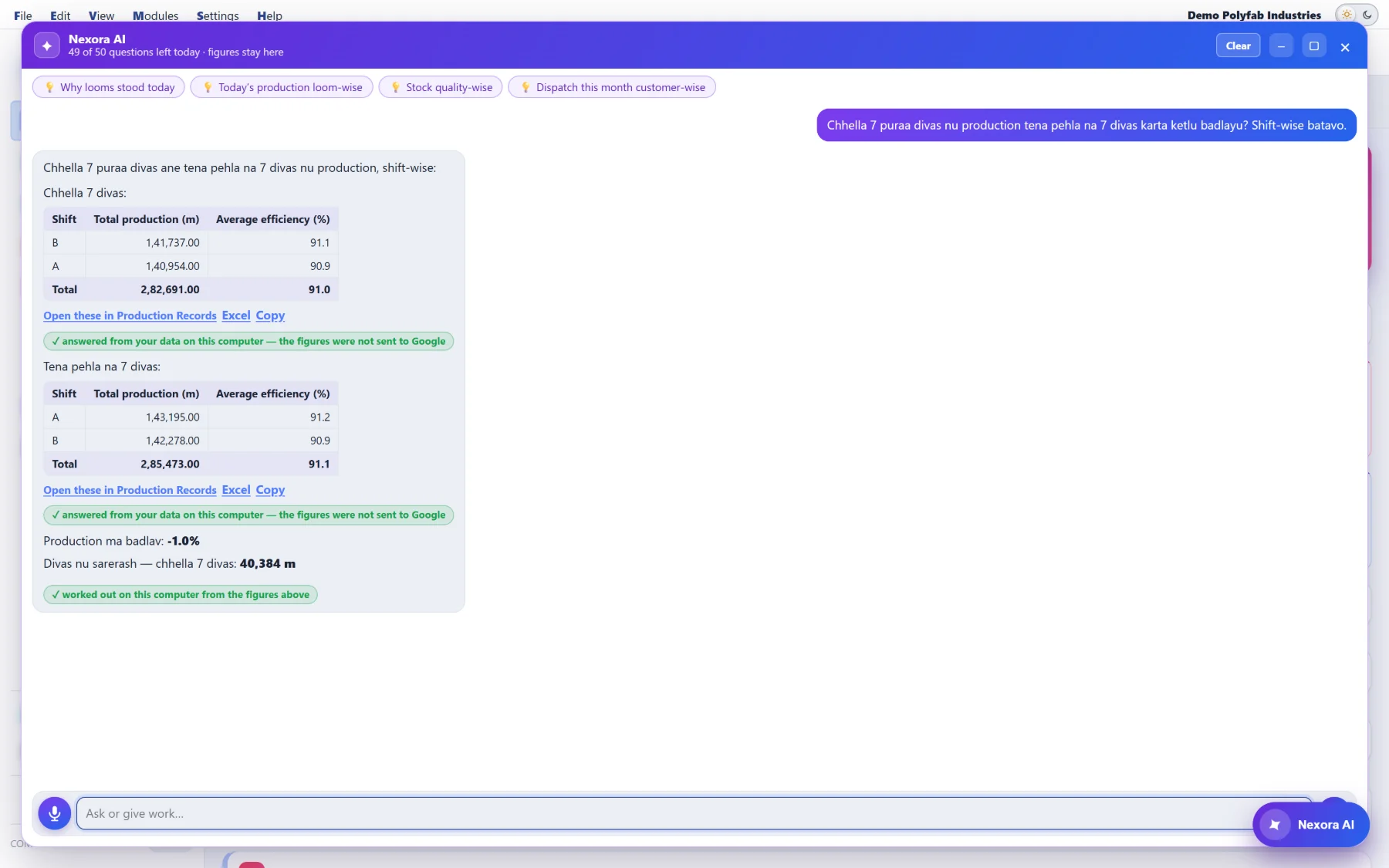
Your figures never leave the computer
Nexora AI writes the search; your own computer runs it on your own records. Every answer says so.
What goes out is the question with customers, operators, people and qualities turned into codes — [C1], [O1], [U1], [Q1] — today's date, the window you are on, and what you are allowed to search. Never a reading, a roll, a weight, a stock or a dispatch figure.
It can do, not only answer
- Follow-ups change the table you are looking at: "add a total", "only Q-90", "loom wise", "top 5"
- Open these in Fabric Stock, Production Records, the Packing Slip or the Dispatch Register — the window opens holding exactly the records it found
- Run fills a window from what you said — a slot's readings, receipt rows, a FIFO packing slip — and never saves; you check it and press Save
- Functions: ask for a "GPM difference %" column and it is worked out at once and kept for the company
- Suggestions are worked out on your own computer, with no question sent anywhere
A roll is not a row in a table. It is a story.
Nothing here keeps a "quantity on hand" field. Every figure you see — a quality's stock, a day's opening, an operator's output — is worked out from the things that actually happened to each roll. That is why a day you close today still reads the same when you open it next month.
Short by default, open what you want
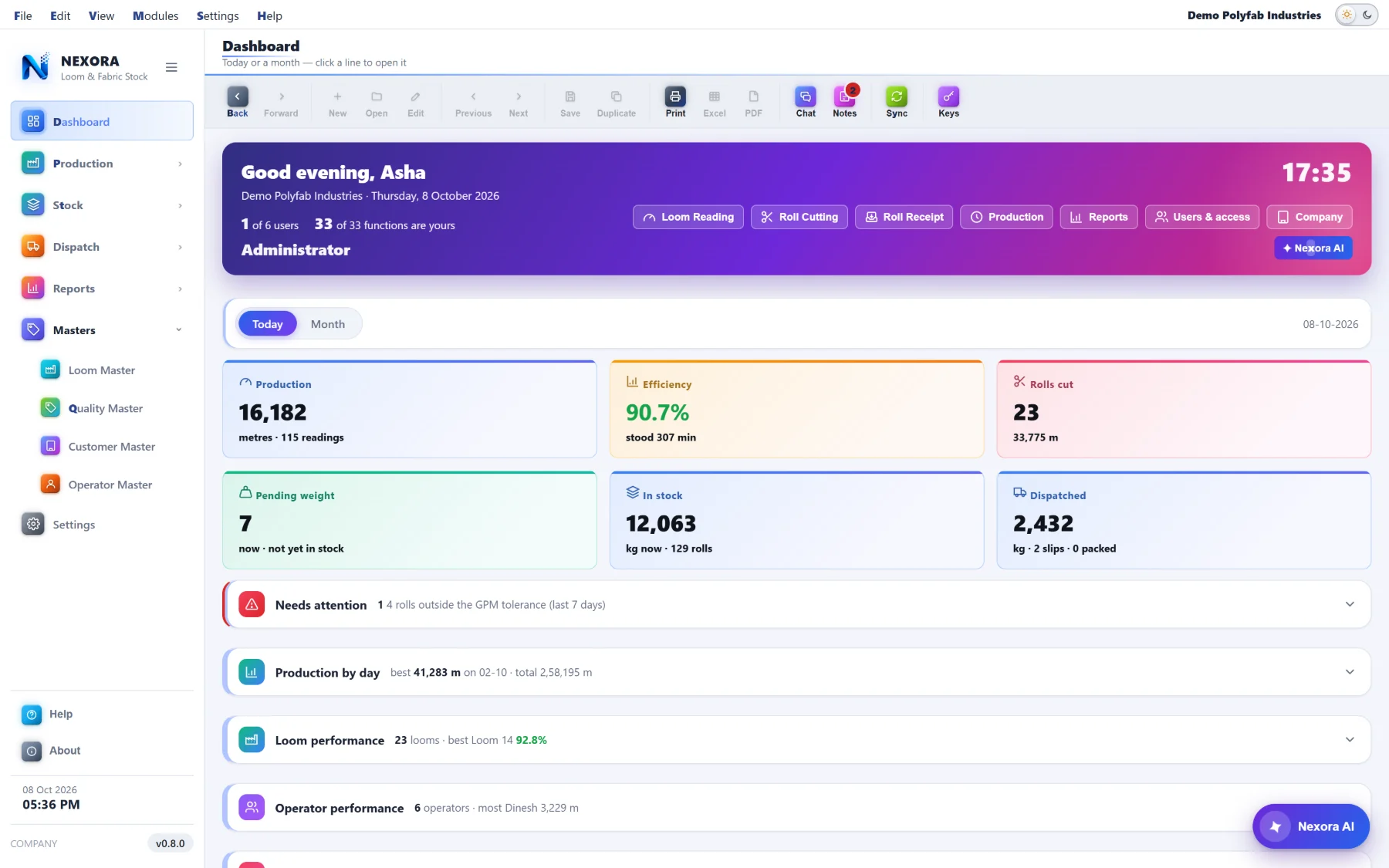
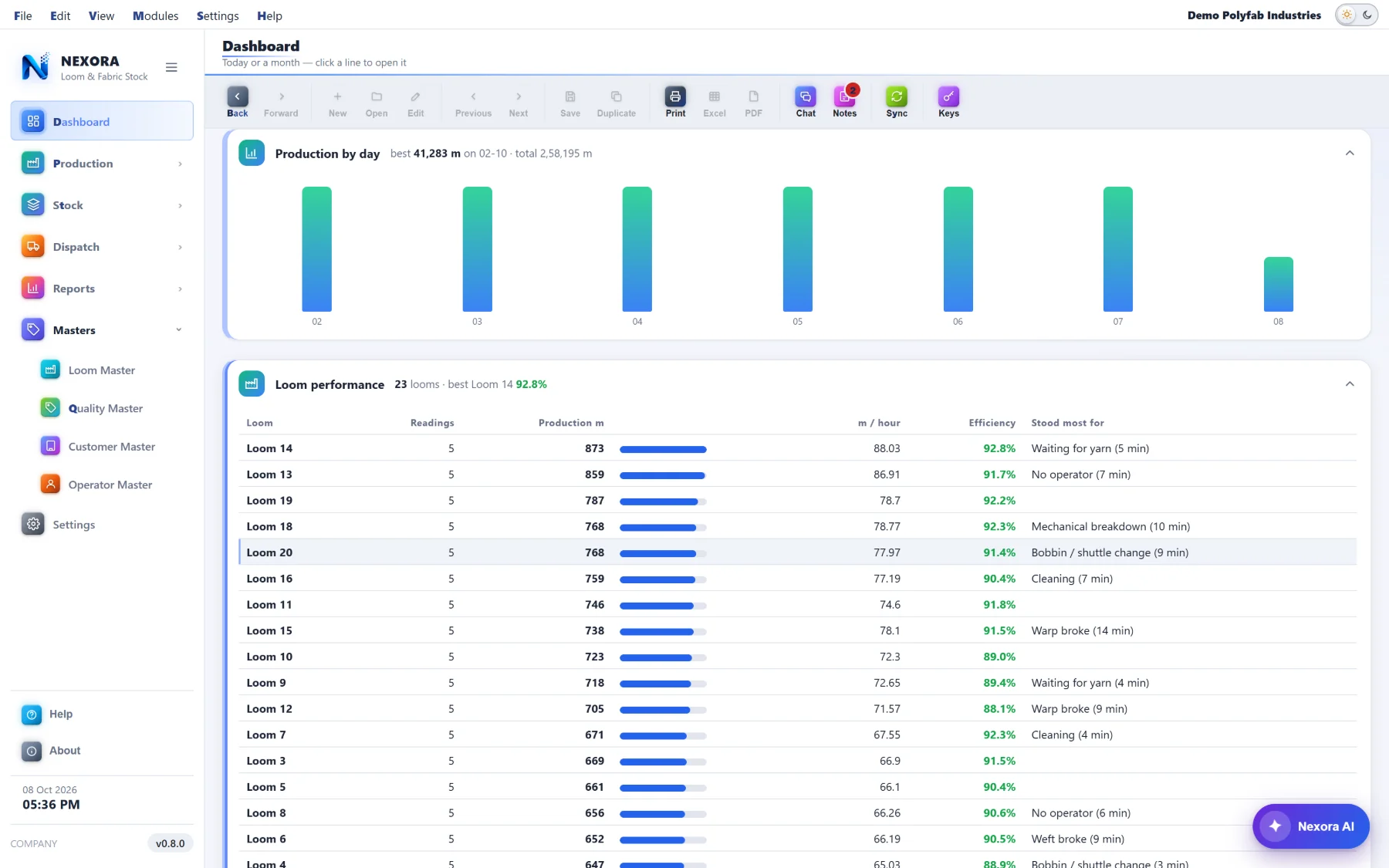
Today or any month of the last two years. Six figures across the top, then every other part is one line with its number on it — click the line and it opens. What you left open, and the period you left it on, is how you find it next morning.
The reading that cannot lie
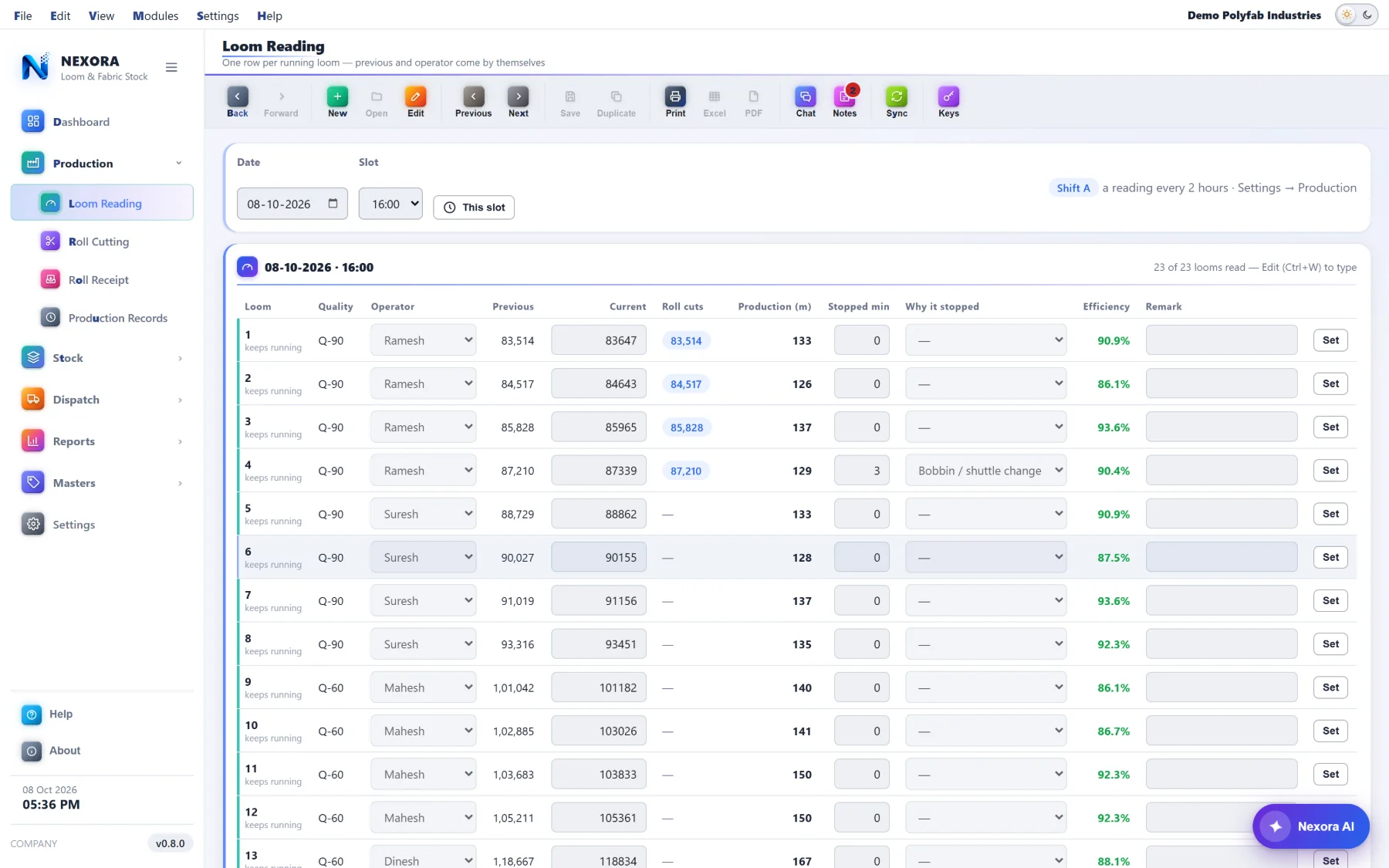
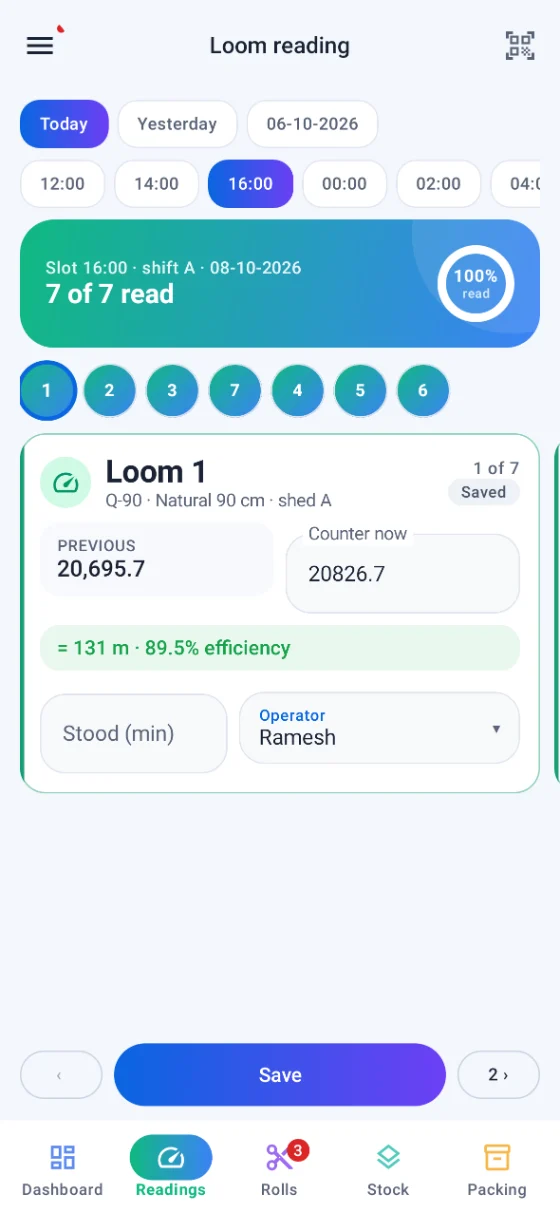
Loom readings are where fabric accounting usually breaks: a counter typed wrong, a roll cut nobody recorded, a loom that stood all evening with no one saying why. Each of those is refused or questioned at the moment it is typed.
- A reading below the previous one, with no roll cut between them, is never saved — the row turns red and the slot stays open
- A loom that stood is not saved without why it stood; the reasons are your plant's own, kept under Settings → Production
- Only an administrator may set a row's previous and current readings, and the row keeps the reason they gave for it
- Roll cuts made during the slot are shown against the loom, so the metres always add up
- Your own reading order. A hundred looms are not read 1, 2, 3 — type "1-6, 11-16, 7-10" once and the computer, the phone and the "not read" warning all walk the floor the way your reader does
Efficiency, from the loom's own speed
A loom's speed is in picks a minute (shuttles × RPM) and a quality has its picks per inch. From those two the application knows what that loom should make in an hour, and compares it with what it did make in the minutes it actually ran.
efficiency = production ÷ expected, for the minutes the loom ran
Efficiency shows per row and per slot as you type. A reading keeps the speed and the picks per inch as they were on the day, so re-tuning a loom next year does not quietly rewrite last year's efficiency.
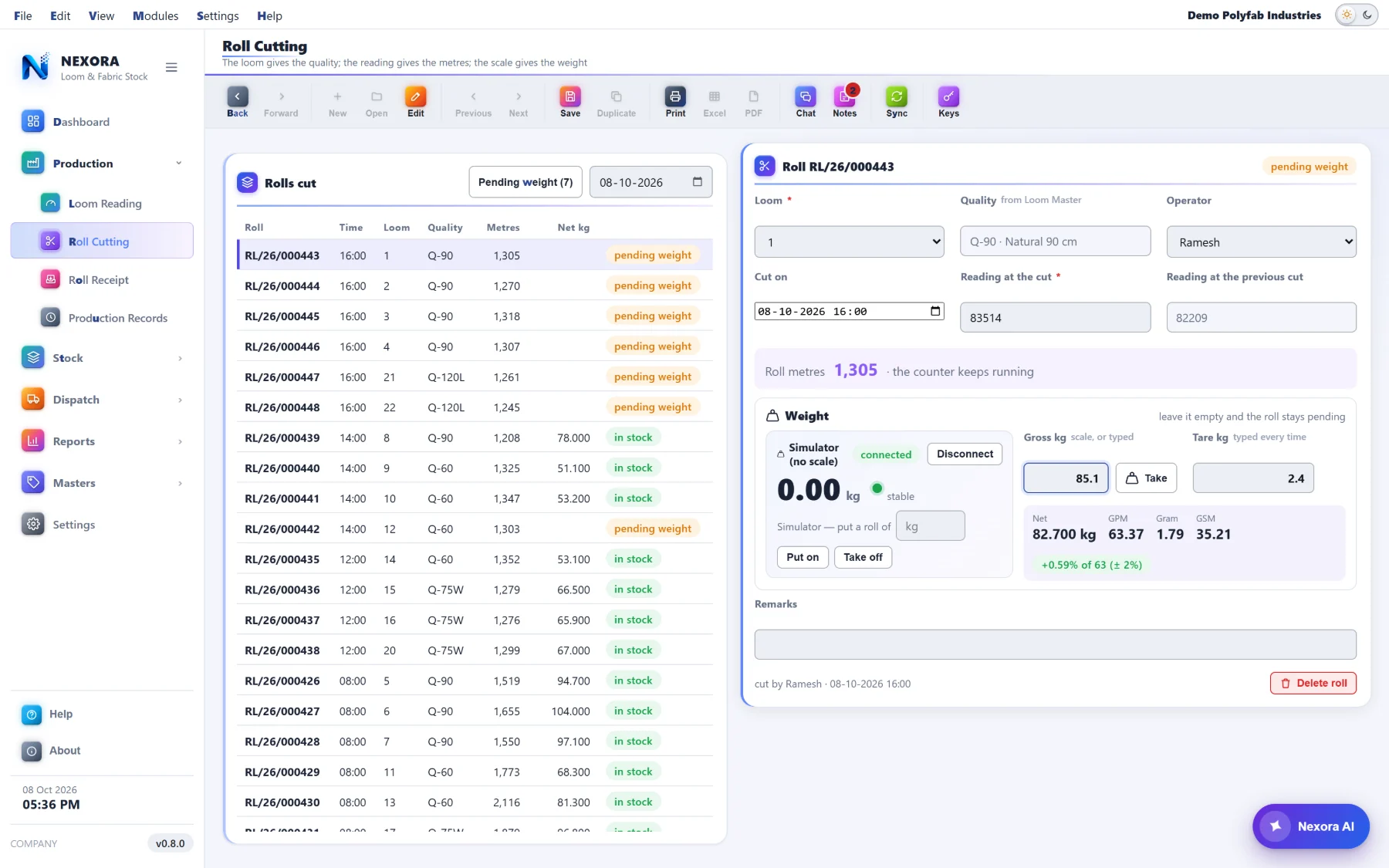
The scale is at the machine, not in a separate window
There is no "roll weighing" screen to go and find. The weight is taken where the roll is made — in Roll Cutting and in Roll Receipt — because that is the one moment somebody is standing next to it.
What the scale gives, and what you type
- A stable weight comes into the gross by itself — and only after the scale has been emptied since the last roll, so one roll's weight can never land on the next
- Take takes the reading again; a person given the right may type a weight by hand when the scale is down
- The tare is typed every time, because a core is not always the same core
- Net, GPM, gram and GSM are worked out from the quality's size and whether it is tubular or flat
- GPM is held against that quality's ± tolerance; outside it the figure turns red and saving asks you first
Any scale, and one for training
A scale on RS-232 or USB-serial, read by the window itself — nothing extra to install on the computer. Port, speed, data bits, parity and stop bits are yours to set, and so is how your scale writes a weight: continuously, the A&D ST,GS,… form, a plain number, or a pattern you give it.
Several set-ups can be kept with one in use, each computer with its own. There is a simulator too, so a new operator can be trained and the whole chain tried on a machine that has no scale attached at all.
Settings → Weight scale, with a live test against the last line your scale actually sent.
The label that makes the roll findable
A roll with a printed label is a roll anybody can identify at the far end of the godown with a phone. Printed straight to a thermal label printer when the weight is saved — no dialog, no waiting.
- Five designs to choose from — Classic, QR left, Big figures, Boxed, Dark band — each drawn for the size you print at
- A QR carrying the roll number first, then quality, weights, metres, GPM, GSM and gram — readable by any phone camera, no app needed — and a Code 128 barcode if you want one too
- Your logo on it, or not
- Label width and height, the gap between labels, and a nudge right or down — per computer, because the printer on the shop floor is not the one in the office
Fabric Stock, and what is behind every line
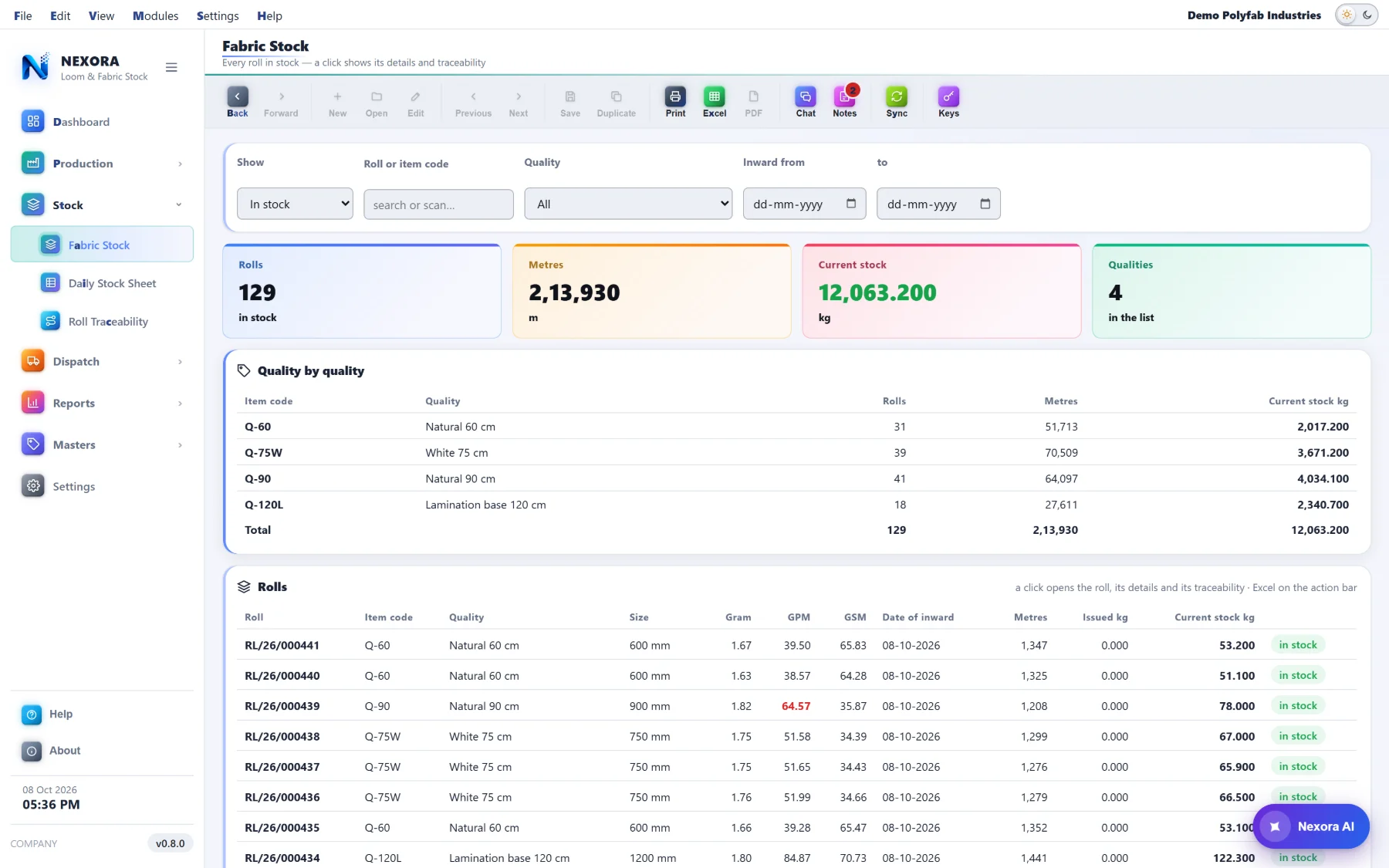
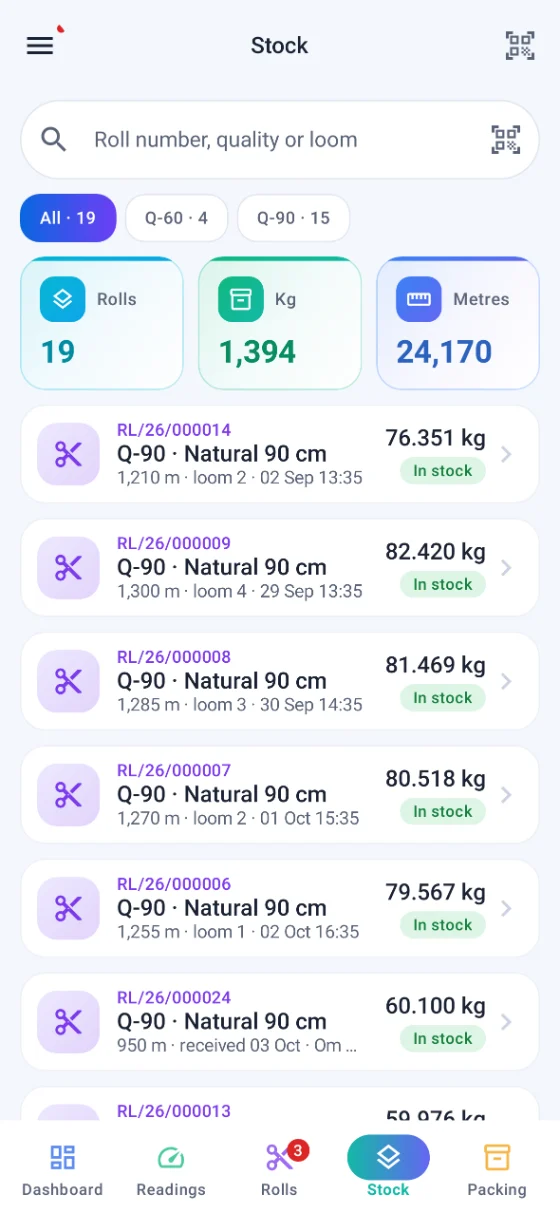
In stock, pending weight, or every roll ever made. Search it or scan a roll, filter by quality and inward date, and see each quality's totals.
Item code • quality • size • gram • GPM • GSM • date of inward • metres • issued kg • current stock
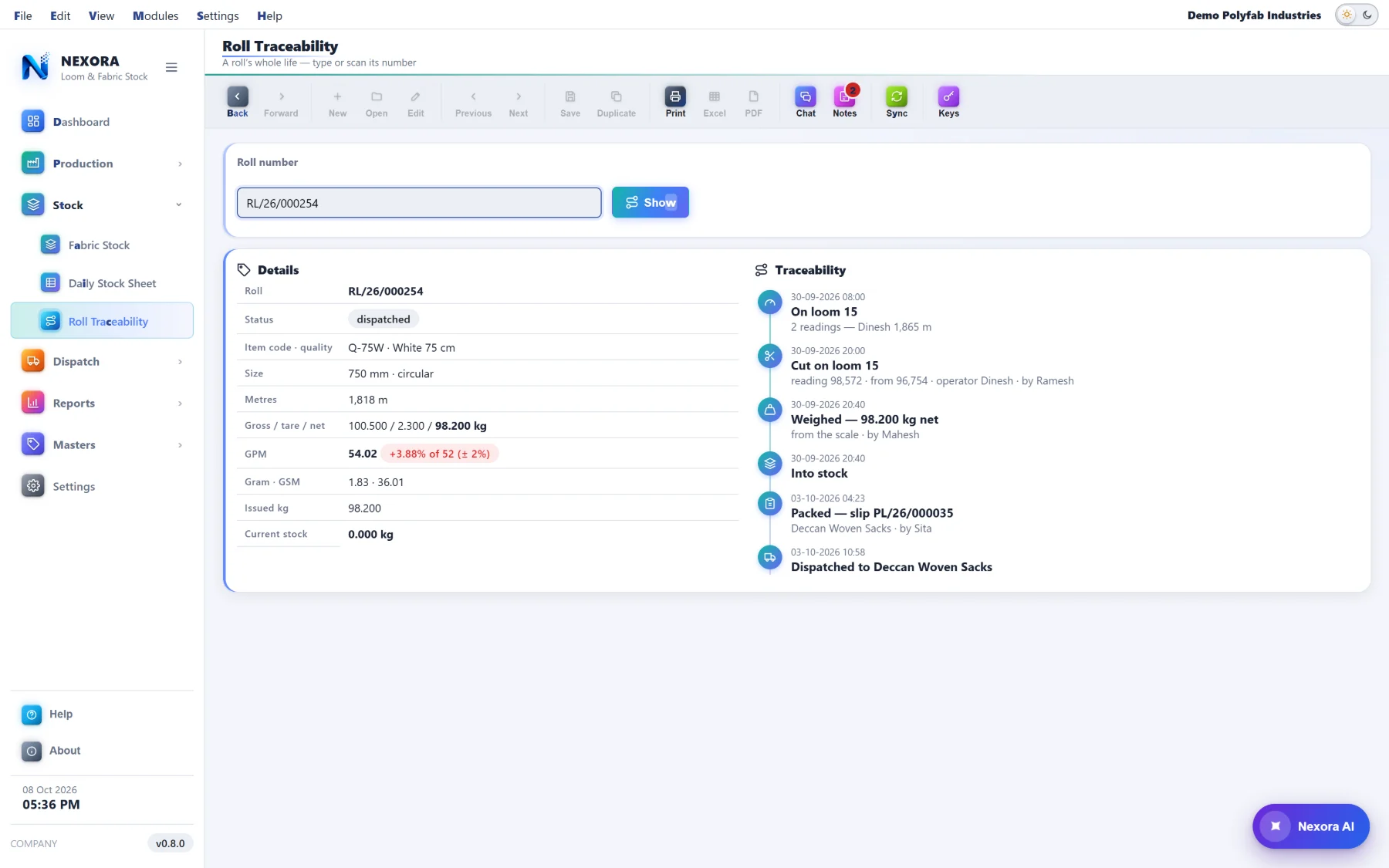
A GPM outside its tolerance stays red in the list, so a bad roll is visible without opening it. Click any roll and you get its details and its traceability together — the loom it came off and the operators whose metres made it, when it was cut or received, how it was weighed and by whom, when it went into stock, and which packing slip and dispatch took it out. Excel of the lot, whenever you want it.
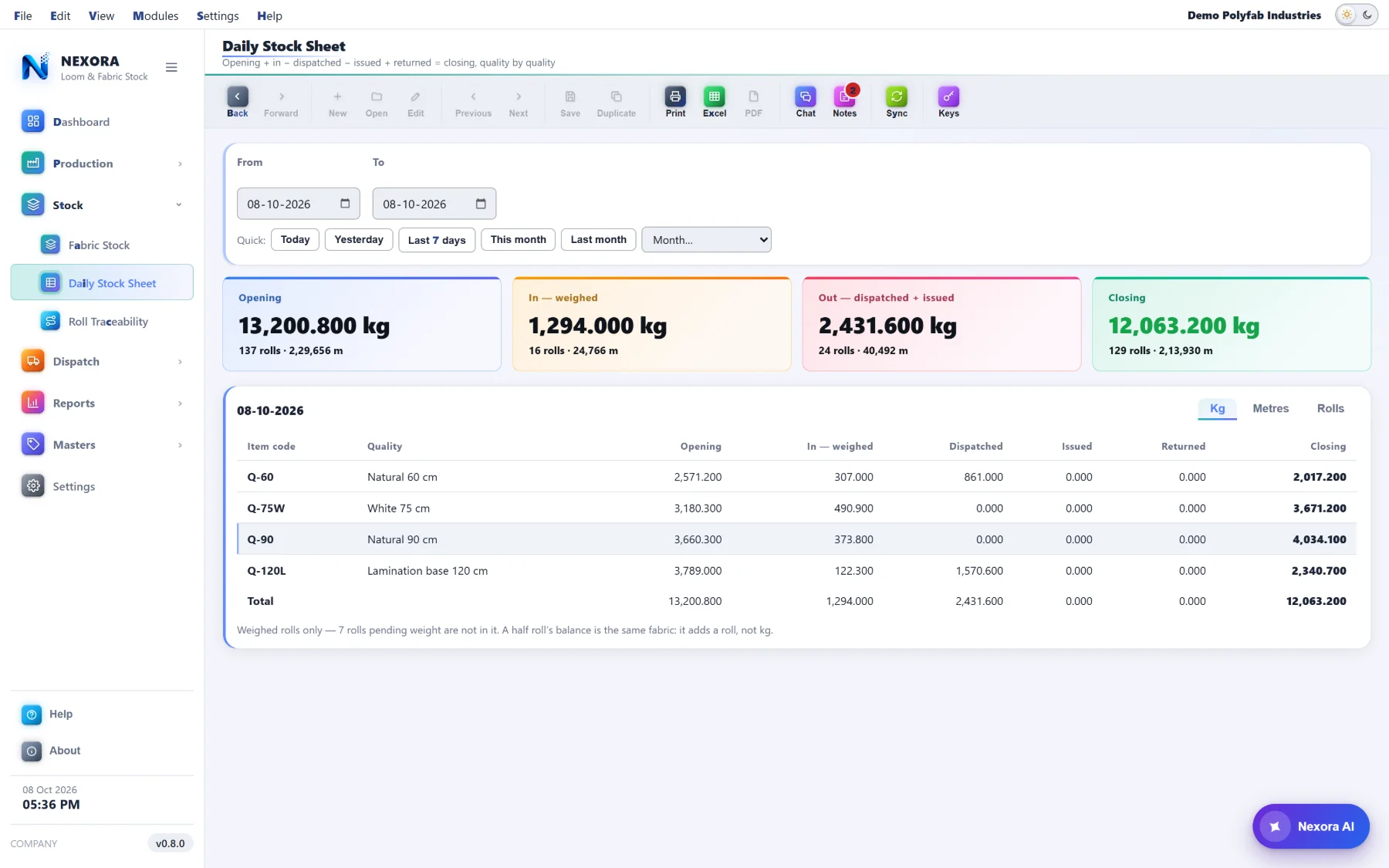
A stock sheet that still agrees with itself next year
Quality by quality, the oldest arithmetic in the trade — and every figure in it worked out from the rolls themselves rather than from a running total somebody could have nudged.
Kg, metres or rolls
One at a time on the screen so a column means one thing; the Excel has all three side by side.
A half roll is still a roll
Issue part of a roll and the balance adds a roll to the count, not a fraction of one — because that is what is standing in the godown.
It ties back
The closing figure equals Fabric Stock's current stock. If the two ever disagreed, one of them would be a running total — and neither is.
Out of the gate, on paper
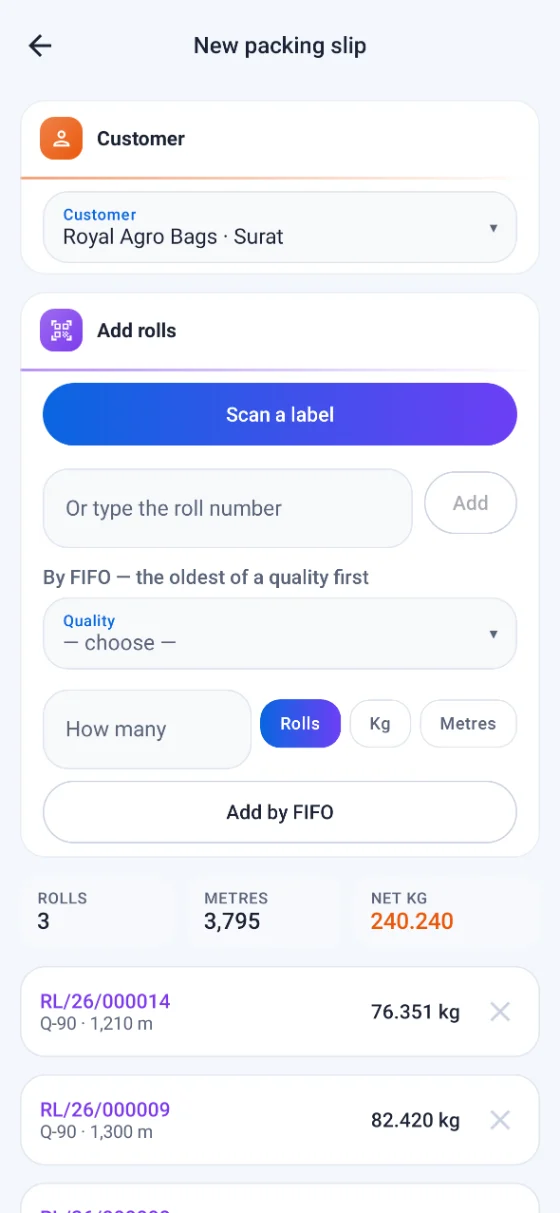
The packing slip is made from rolls you pick — scanned, typed, or the oldest of a quality taken by FIFO — and it carries its own dispatch with the vehicle, driver, transporter, LR, invoice and e-way bill. The dispatch register is the list of what left and when. Returns and internal issues come back through the same ledger, so the stock never has to be corrected by hand.
- A roll that was partly issued inside the plant cannot go out on a packing slip at its full weight — it is refused, and told how many kilograms have already gone
- A dispatch counts at what was actually left on the roll
- The slip previews on screen and prints as a slip, not as a web page
The shift report, and who ran it
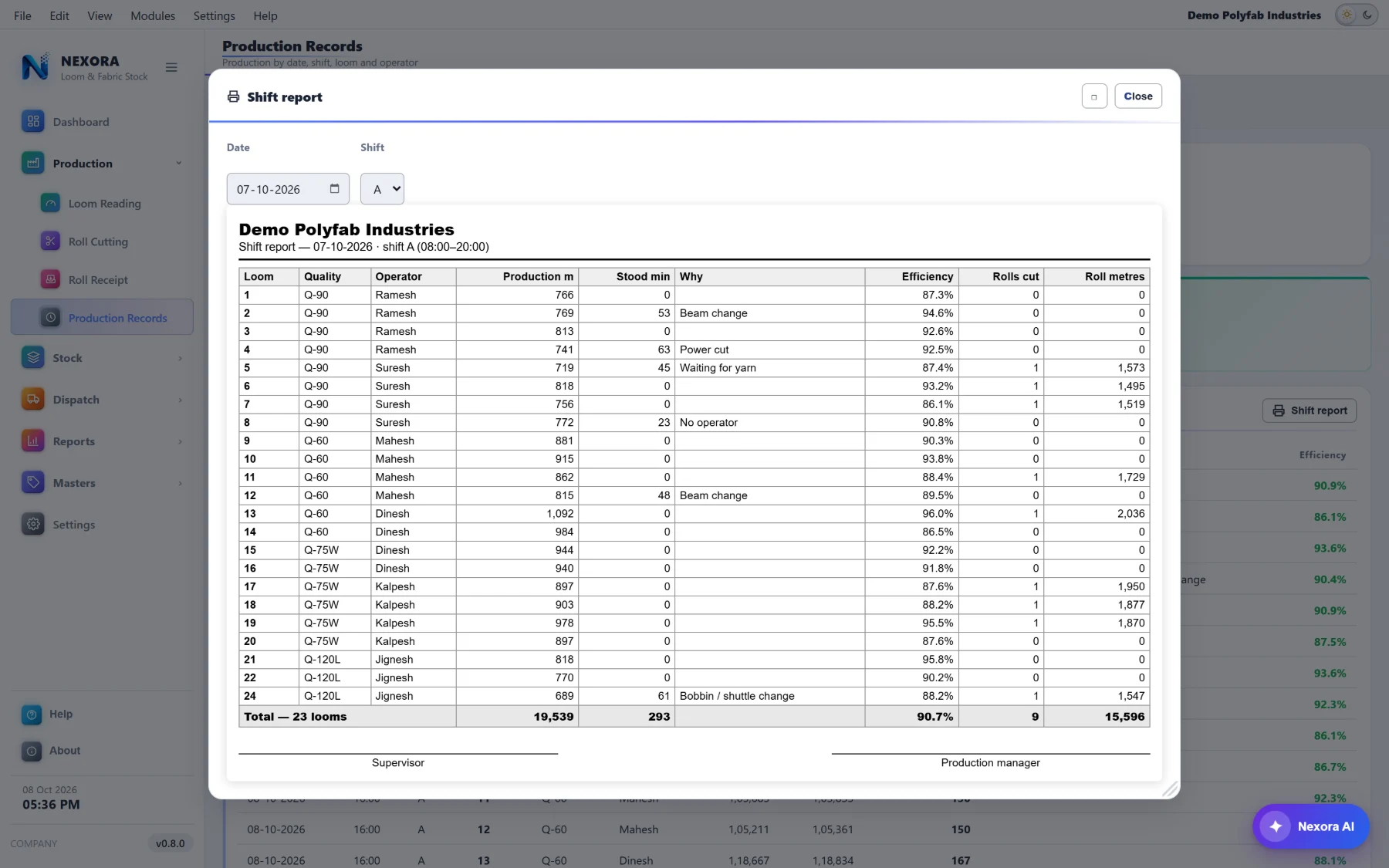
A date and a shift, loom by loom: quality, operator, production, minutes stood and why, efficiency, rolls cut, totals and signature lines. Printed on A4 or saved as a PDF — the sheet a supervisor hands over at the end of a shift.
Operator performance sits beside it: each person's readings, looms, hours run and minutes stood, production with a bar, metres an hour, efficiency, how far they are from the plant's own average, and what they stood for most.
It is there to look at, not to pay by. That is deliberate. A number that decides somebody's wages gets gamed, and then it stops telling you anything about the looms.
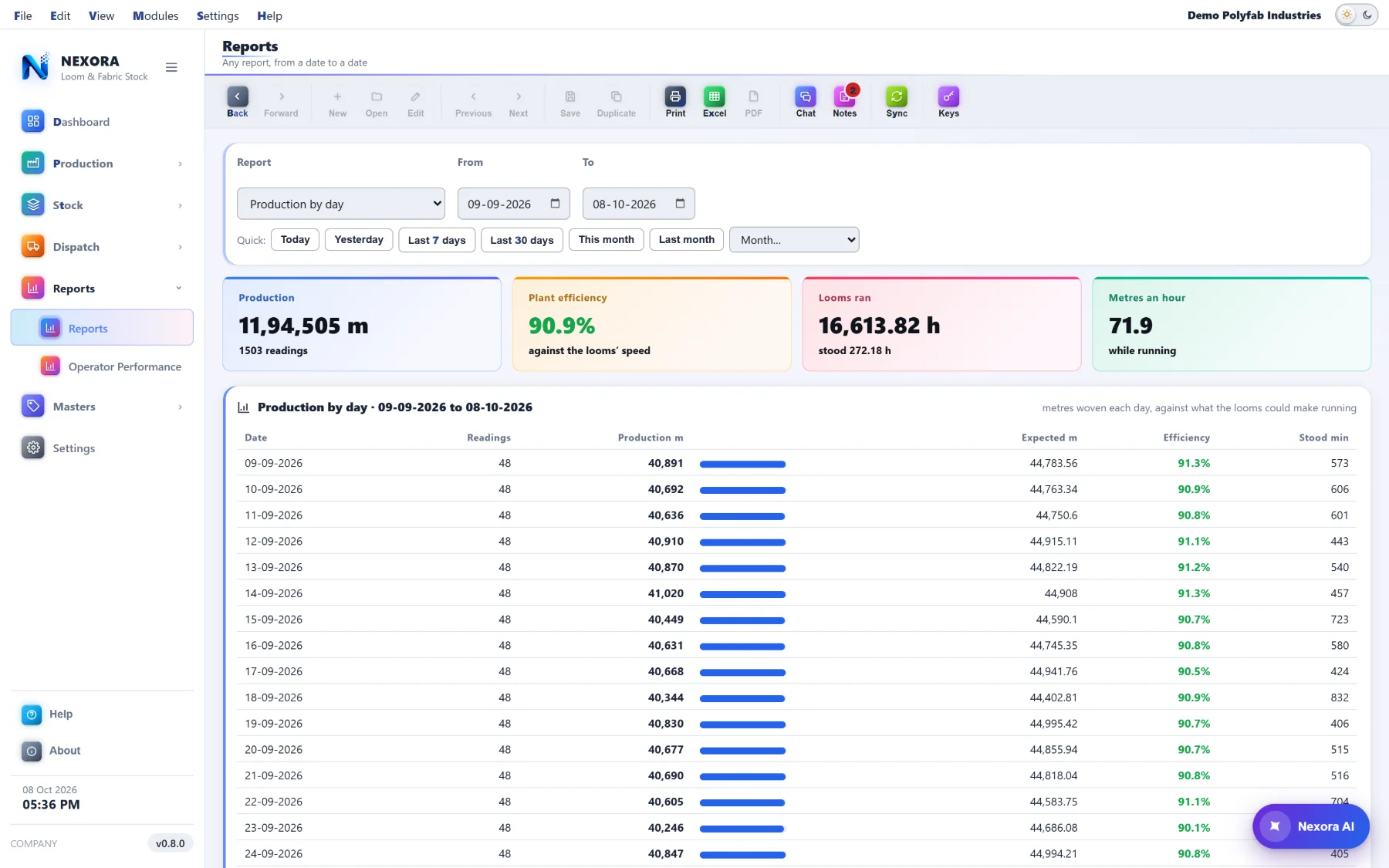
Any report, from a date to a date
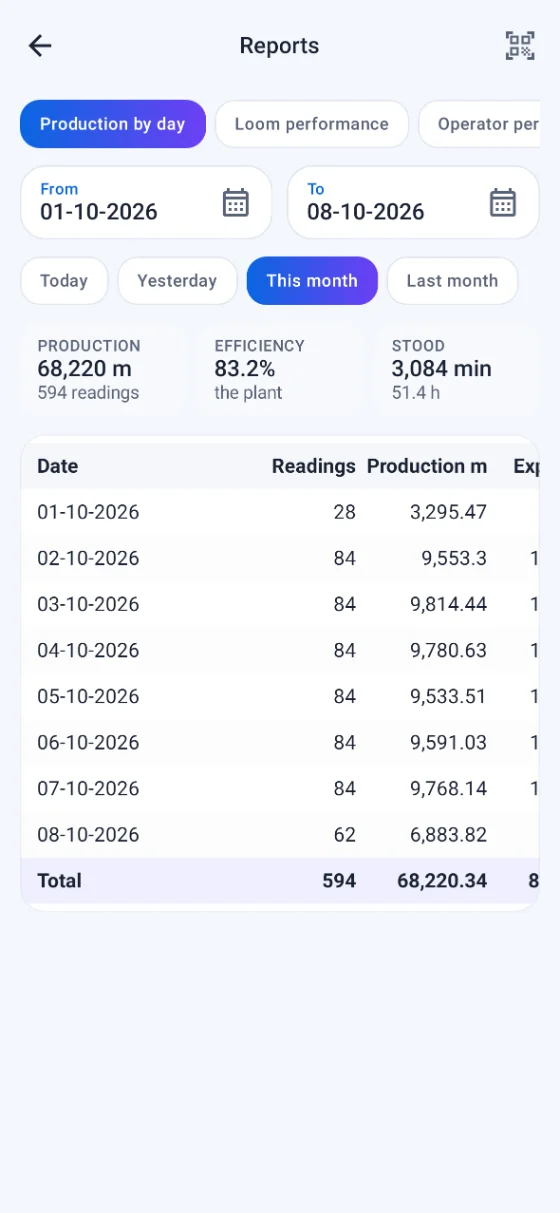
Production by day or by shift, loom performance, operator performance, why the looms stood, quality-wise production, rolls cut and received, dispatch by customer. Each with its figures, a table and a total line — and out to Excel, Print or PDF.
Quick, or exact
Today, yesterday, 7 or 30 days, this month, last month, or any month from the list — and From / To for anything else.
The same dates everywhere
Production Records, the Stock Sheet, Operator Performance and the Dispatch Register all gained the same quick dates, so you are never re-learning a filter.
Excel, Print, PDF
Every report leaves the application in the form the person asking for it actually wanted.
Talk about a roll, not about “that roll”
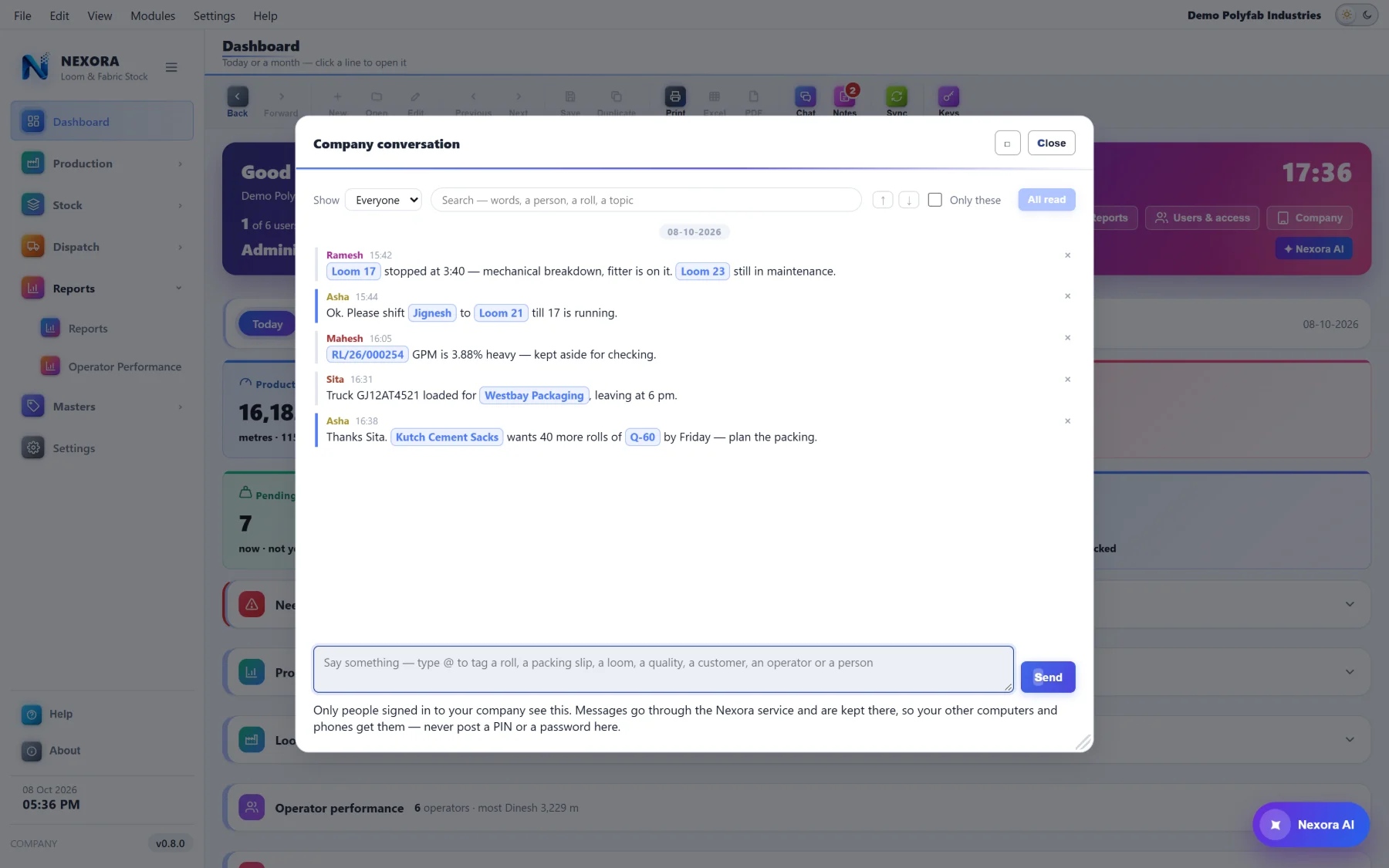
Half of what goes wrong in a plant is said out loud and never written down — which loom was short, which roll to hold back, which slip to check. The company has one room inside the software, and anything said in it can carry the record it is about.
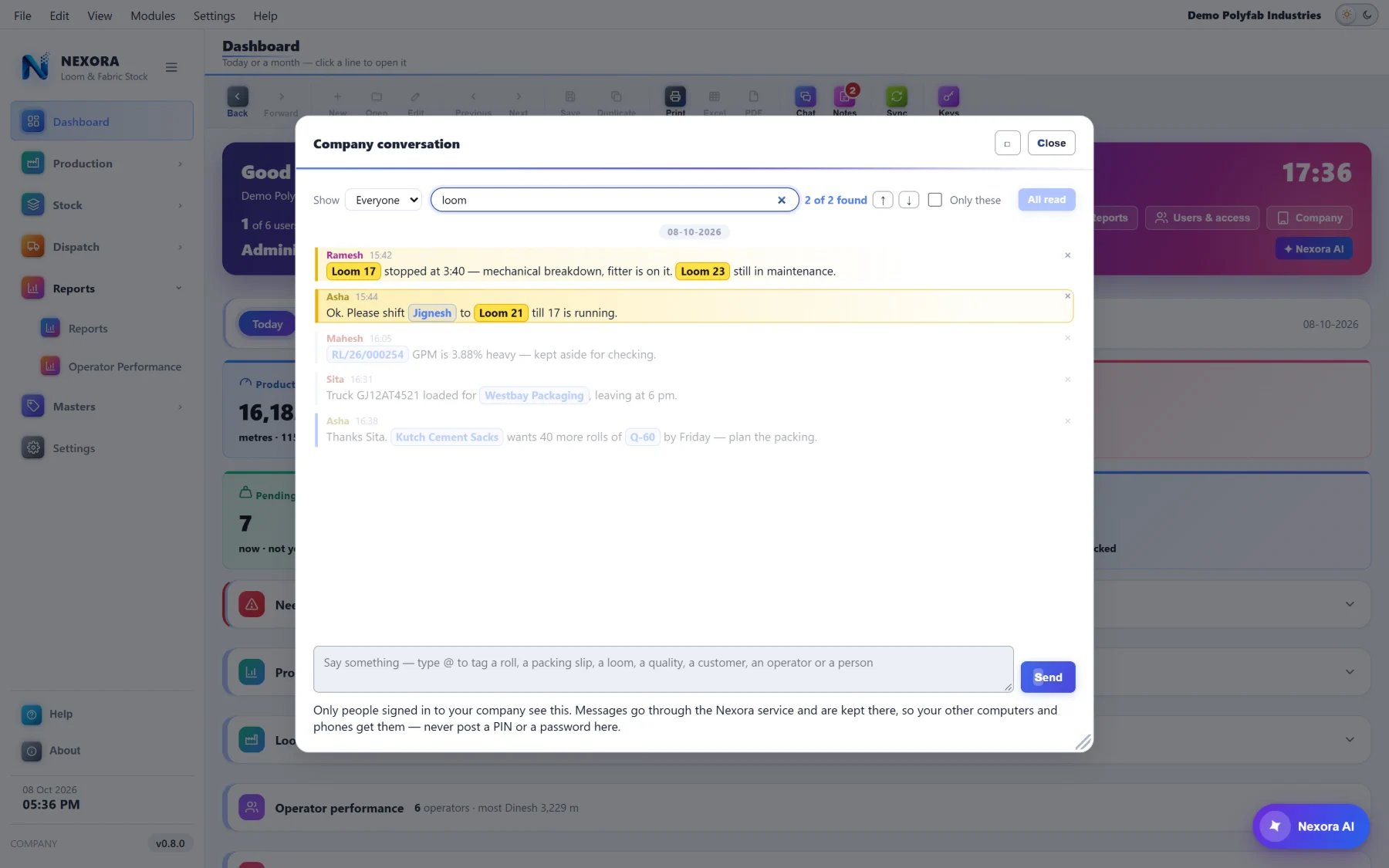
A message that carries the record
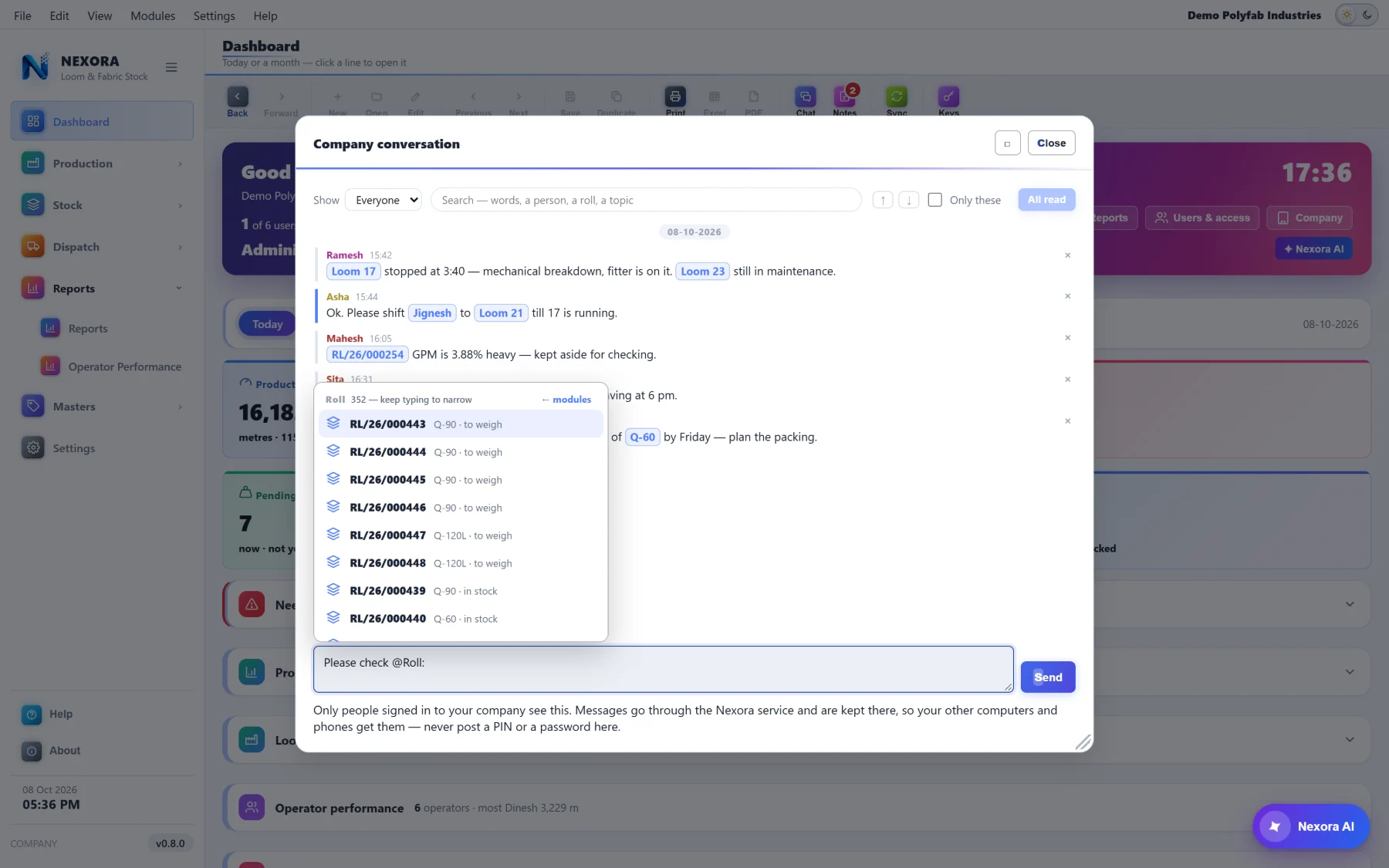
Type @ and pick what you mean — a roll, a packing slip, a loom, a quality, a customer, an operator or a person on the company. It goes into the line as a chip.
Anyone who clicks that chip gets the record itself: a roll opens with its details and its whole story, and from there straight into the window it belongs to. Nobody has to go and look it up.
- Only people signed in to your company see it — nobody else
- Kept by the Nexora service, so your other computers and phones get it
- Unread ones are marked, counted on the button, and cleared when you have read them
- Show one person at a time, or everyone
And a pad that is only yours
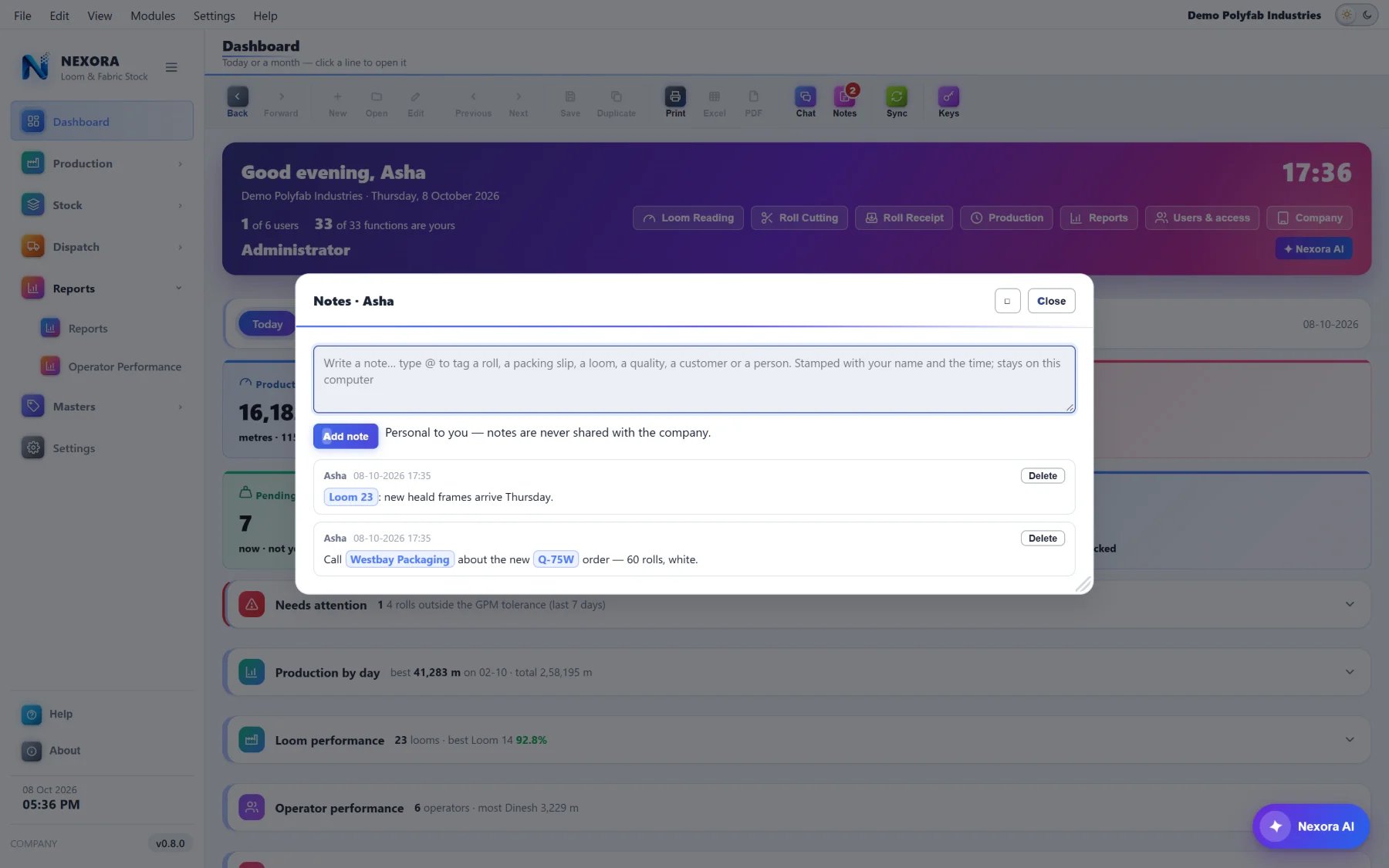
Notes sit on the same bar and work the same way — @ tags the same records — but they go nowhere. A note is stamped with your name and the time and stays on that computer. It is never shared with the company and nobody else can read it.
“Ask Suresh about RL/26/000101 tomorrow”, with the roll as a chip you can open. Delete it when it is done.
The floor does not sit at a desk
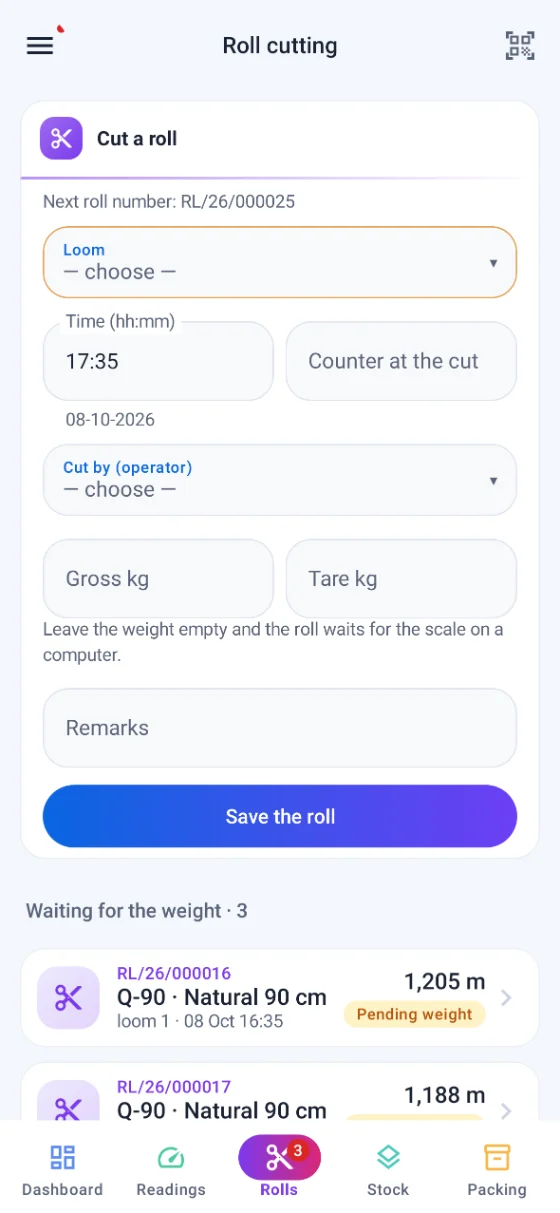
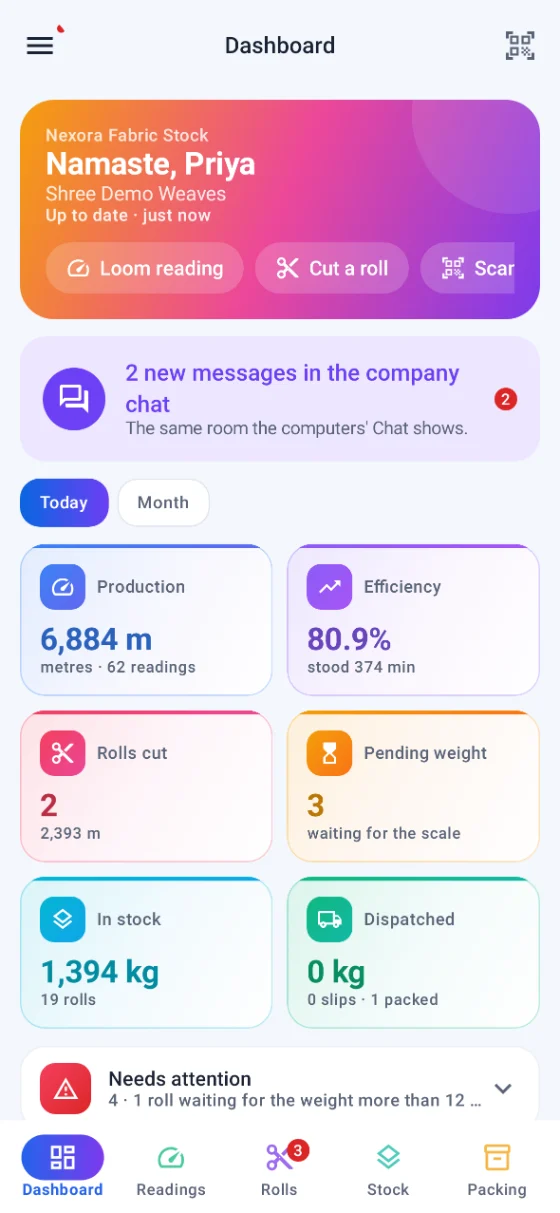
An Android app on the same company, the same people and the same records. Readings and roll cutting at the loom, stock and a label scan in the godown, packing and dispatch at the gate — and the dashboard wherever you are standing. It keeps working without a signal and sends what it has at the next sync.
One loom to a card
Swipe through the slot in your own reading order, with a strip at the top showing which looms are done. Next on the keyboard brings the following loom with its counter ready. One Save covers the whole slot.
Scan anything, anywhere
A roll's QR or its Code 128, from any screen. No camera permission is asked for.
Two people, one record
If somebody changed it first, both copies are kept — yours, with the company's under Versions. A roll number taken offline by another phone is given the next free one.
Android 8 and later. A phone joins with the company id and passcode and waits for the administrator's yes; the phone's own key never leaves it. Screenshots on the phone are blocked unless the administrator allows them for that person.
Five things it will not let you forget
On the dashboard, on the computer and on the phone. Each line opens the window that fixes it, and a person only sees the lines for windows they are allowed to open.
Looms not read
Running looms with no reading in the last slot.
Rolls waiting to be weighed
More than twelve hours between being made and being weighed.
GPM out of tolerance
Rolls outside their quality's band in the last seven days.
Looms under 70%
Below seventy per cent efficiency today.
Rolls standing too long
In stock more than thirty days.
And who may see them
A person is shown only the lines they could act on, because a warning you cannot fix is just noise.
Frequently asked
Is Fabric Inventory part of Nexora Sales & Costing, or its own application?
Its own. It installs separately, keeps its own data and runs on its own, so a weaving unit that does not cost bags can use it alone. It wears the same look, the same menus and the same rules about who may do what, so anybody who already uses Nexora is not learning a second application.
What kind of weighing scale does it work with?
A scale on RS-232 or USB-serial. The window reads it directly, so there is nothing extra to install on the computer. You set the port, speed, data bits, parity and stop bits, and how your scale writes a weight — continuously, the A&D ST,GS,… form, a plain number, or a pattern you give it. Several set-ups can be saved with one in use, and each computer keeps its own.
What if we do not have a scale yet, or it breaks?
There is a simulator, so the whole chain can be tried and an operator trained on a machine with no scale attached. And a person who is given that right can type a weight by hand when the scale is down — it is recorded as typed, not as weighed, so you can always tell the two apart later.
Does the roll counter reset when a roll is cut?
Whichever your plant does. Some keep the counter running across cuts and some zero it, so it is a setting — for the company, and for a single loom that behaves differently. The metres come out right either way: cut minus previous cut when it keeps running, the cut reading itself when it resets.
Can somebody fix a wrong loom reading?
Only an administrator, and the row keeps the reason they gave. An ordinary reading that falls below the previous one with no roll cut between them is never saved at all — the row turns red and the slot stays open until it is right. That is the one place where being strict saves a month of argument later.
What does a roll label carry?
A QR with the roll number first and then quality, weights, metres, GPM, GSM and gram — any phone camera reads it, no app needed — and a Code 128 barcode as well if you want one. Five designs to pick from, your logo on or off, and the label size, the gap between labels and a nudge set per computer. It prints straight to the thermal printer when the weight is saved, with no dialog in the way.
Can we trace a roll back to the loom and the operator?
Yes, and it is one click. Type or scan the roll number and you get its details and its whole story on one screen: the loom it came off and the operators whose metres made it, when it was cut or received, how it was weighed and by whom, when it went into stock, and which packing slip and dispatch took it out.
Why does the daily stock sheet agree with the stock screen?
Because neither of them is a running total. Both are worked out from what happened to each roll, so the sheet's closing figure and the stock screen's current stock are the same number arrived at twice. It also means a day you closed last month still reads the same today.
Can a roll be dispatched after part of it was issued inside the plant?
Not at its full weight — it is refused, and told how many kilograms have already gone. A dispatch counts at what was actually left on the roll. This was a real fault that got through once; it is now one of the things the service checks before it will accept the document.
Is operator performance meant for calculating wages?
No, and deliberately so. It is there to look at — whose looms run, who stands the longest and what they stand for. A figure that decides somebody's pay gets managed rather than reported, and then it stops telling you anything useful about the looms.
Is there a phone app, and does it do the same things?
Yes — an Android app (Android 8 and later) on the same company, the same people and the same records. Loom readings swiped one loom to a card, roll cutting, stock with a label scan, packing and dispatch, the dashboard and the reports. A phone joins with the company id and passcode and waits for the administrator's approval; its own key never leaves it.
What happens on the phone when there is no signal?
It keeps working. What you save goes into the phone's store and its queue together and is sent at the next sync. If somebody changed the same record first, both copies are kept — yours, with the company's under Versions — and a roll number already taken offline by another phone or computer is given the next free one.
Does Nexora AI send our production figures to Google?
No. Nexora AI writes the search and your own computer runs it on your own records — every answer says so on the screen. What goes out is the question with customers, operators, people and qualities turned into codes like [C1] and [Q1], today's date, the window you are on and what you are allowed to search. A reading, a roll, a weight, a stock or a dispatch figure is never sent.
What can Nexora AI actually do here?
Answer a question about your records in English, ગુજરાતી or हिन्दी with a sentence, the figures and a table; change that table on a follow-up ("only Q-90", "loom wise", "top 5"); open Fabric Stock or Production Records holding exactly the records it found; fill a window from what you said — a slot's readings, receipt rows, a FIFO packing slip — which it never saves, you check and press Save; and work out a new column from a formula you asked for in words.
Can people talk to each other inside the software?
Yes — the company has one room. Only people signed in to your company see it, and a message can carry the record it is about: type @ and pick a roll, a packing slip, a loom, a quality, a customer, an operator or a person, and it goes in as a chip. Click the chip and the record itself opens, with its whole story, on whatever computer you are at. It is searchable by a word, a person, a roll or a topic, unread ones are counted, and it reaches your other computers and phones through the Nexora service.
Are notes shared with the rest of the company?
No. A note is personal: stamped with your name and the time, and it stays on that computer. Nobody else can read it and it is not sent anywhere. It takes the same @ tags as a message, so “ask about this roll tomorrow” keeps the roll as something you can open.
Does it work without the internet?
Yes. It is an offline-first Windows application; the plant keeps working when the line is down and catches up with the company when it is back. People, rights and the masters are shared company-wide.
Put a number on every roll in your godown
Send us how your plant reads its looms and cuts its rolls, and we will show you the chain running on it.