
Nexora Sales & Costing: enquiry, bag weight, BOM and cost for woven sacks
From the buyer’s enquiry to a costed Bill of Materials and the quotation: Nexora Sales & Costing keeps the enquiry and its follow-ups, calculates every gram, forecasts every kilogram of raw material and resource, and locks the answer with a revision history you can print for an audit. Nexora AI does the steps from one sentence, and the Android app takes it to the phone.
Five steps from spec to cost per bag
Pick the construction
Choose one of 29 structures. The engine only asks for the fields that construction actually uses.
Enter the spec
Size, mesh, denier, GSM, coating, patch, valve, liner, print — with target weight and tolerance band.
Weight breakdown
Component-wise grams for body, patch, valve, coating, BOPP, ink, adhesive, thread — with % share.
Route & RM forecast
Order quantity flows through the route. Kilograms per material, waste carried forward at every stage.
Costed BOM
Material cost from the versioned price master plus conversion from process resource rates, reconciled.
From the buyer’s enquiry to the order won
Every requirement a buyer sends is an enquiry with its own number. It is calculated, quoted and followed up in the same program that weighs and costs the bag, until it is won or lost.
The day’s briefing, before the first call
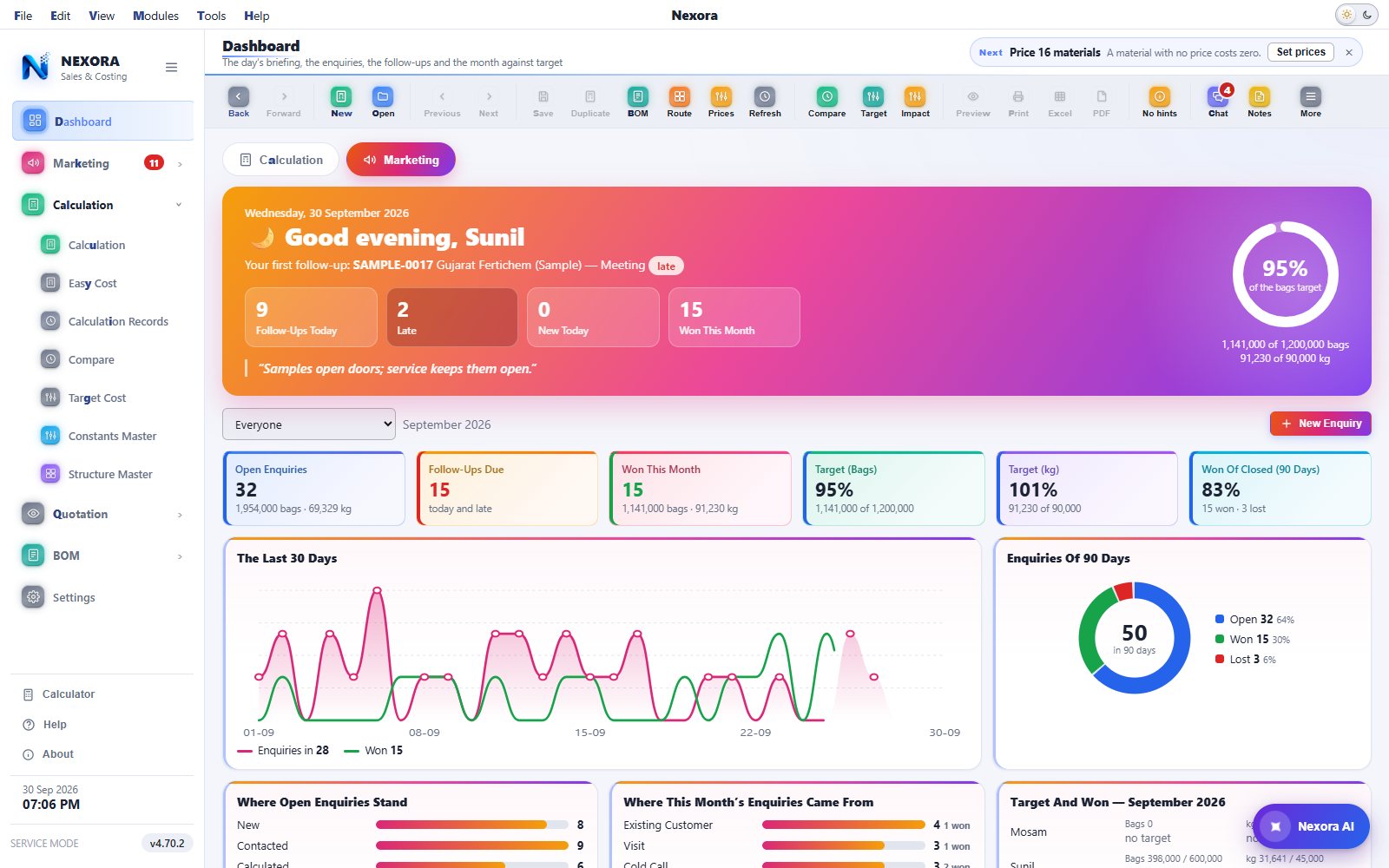
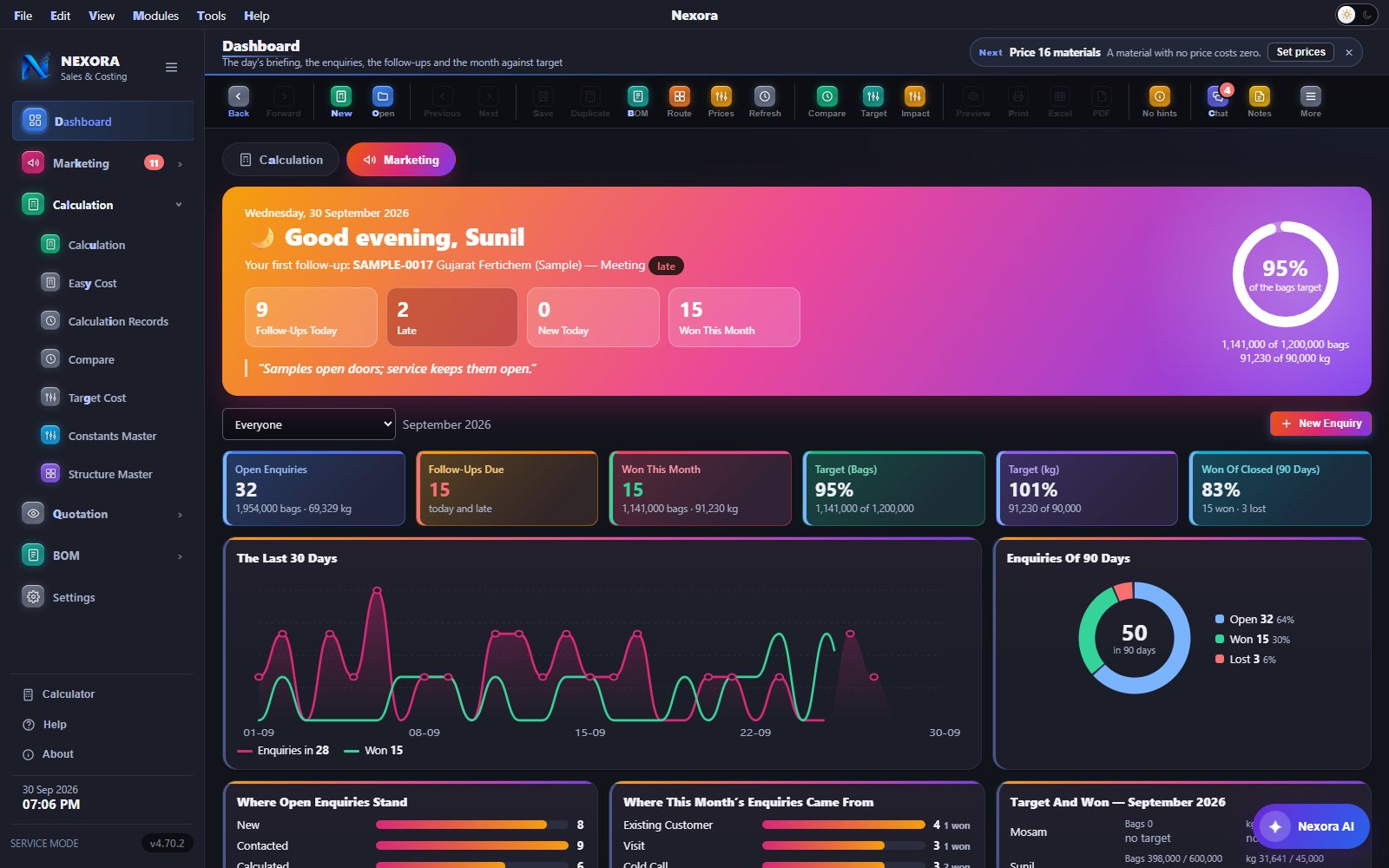
The Dashboard has two tabs, Calculation and Marketing. The Marketing tab opens on a morning briefing for the person signed in: the first follow-up of the day, follow-ups today, late, new today and won this month, and a ring showing the month against target.
- Tiles for open enquiries, follow-ups due, won this month, and the targets in bags and kilograms
- Charts of the last 30 days, where open enquiries stand, where they came from, and target against won for each person
- Monthly targets in bags and kilograms, counted on won enquiries only
Whose enquiry it is, where it stands, and when it is followed up next
One buyer, one requirement, one number. The requirement lines link to saved calculations, and Make Quotation turns them into the quotation. Every call, visit and message is written down with the next date and time, and the late ones come first.
- Customers with many contacts, many addresses and their sub companies; a customer somebody else already has is flagged at once
- Follow-ups: overdue, today and the next seven days, with a reminder, WhatsApp on every row, and Done… to record what happened
- Work done per person, and sources your team adds with an approval
- Each person sees their own enquiries, or the ones the administrator lets them see


See the bag before a single tape is extruded
A weight is a number until you can look at it. Nexora draws the bag your specification describes, turns it, pulls it apart, and puts a size, a weight and a share against every part.
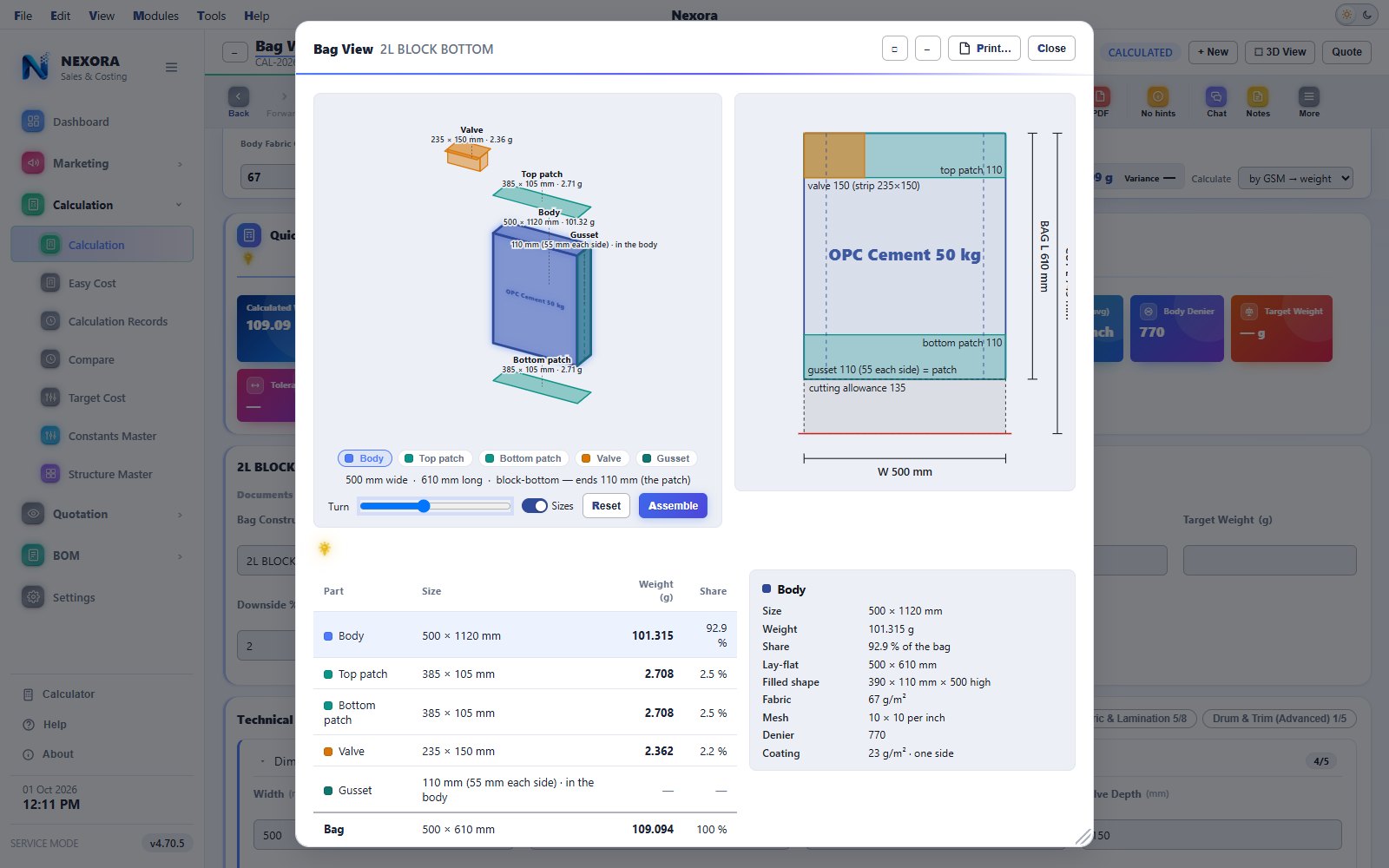
The bag view, opened over its calculation
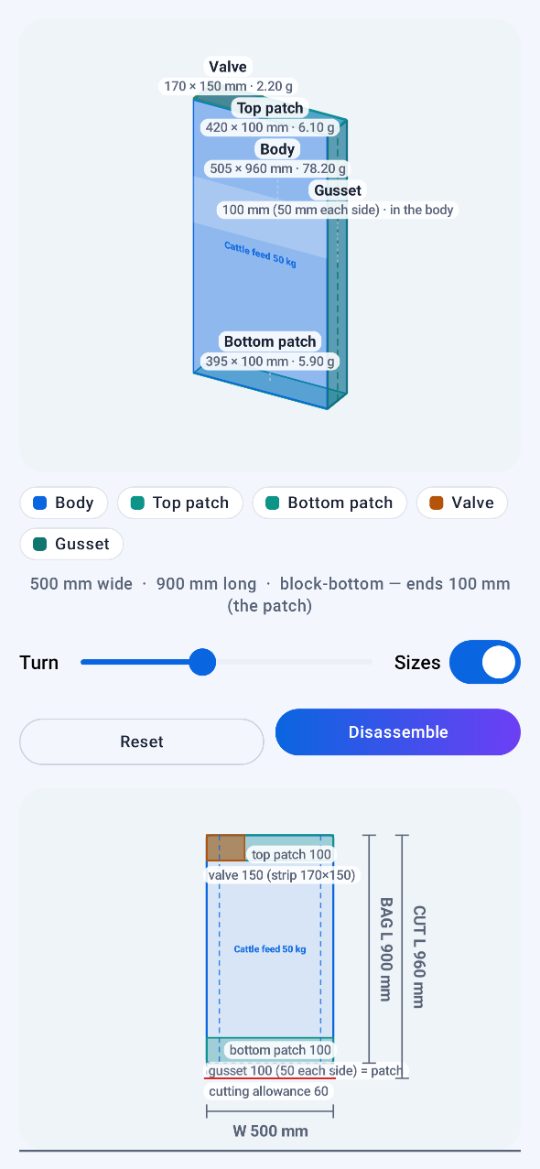
The bag on the left, the lay-flat view to scale on the right, and under them every part with its size, weight and share — here a 50 kg OPC cement bag, 2L block bottom, 500 × 610 mm with 110 mm patches and a 150 mm valve, pulled apart with the body chosen: cut at 500 × 1120 mm, 101.32 g, 92.9 % of the bag. Click a part in the drawing, in the legend or in the list to see its own size, weight and make-up; Disassemble pulls the bag apart.
- An extended valve is drawn standing proud of the bag, to scale, and labelled
- A Sizes switch takes the labels off for a clean picture
- The drawing prints on a sheet of its own, and on the calculation sheet
- The same bag view opens on the phone, in Nexora Mobile
Your bag, not a picture of one
A construction with a patch is drawn as a block whose ends are its patches. Without one it is the lay-flat tube. The item name is printed across the face, so the bag on screen is the bag on the order.
Pull it apart
One button floats every part clear with its name, size and weight: body, top and bottom patch, valve, handle, liner, stitching yarn, easy-open tape and back seam, each in its own colour.
Click a part, get the truth
Any part opens a card with its size, weight, share of the bag and what it is made of, down to the fabric GSM, mesh, denier and coating. Every figure is the engine's; the drawing calculates nothing.
Where a drawing earns its keep
A supervisor spots a wrong patch depth in a second on a drawing and never in a field. The lay-flat view beside it is to scale, with the valve strip and both patches dimensioned, so the cutting size can be checked before the loom runs.
What the artwork costs in ink, before the job runs
Ink is the one material a bag costing usually guesses. Drop in the PNG or JPG you print and Nexora reads how much of the sheet each of cyan, magenta, yellow and black covers, then returns the ink and solvent the job should draw.
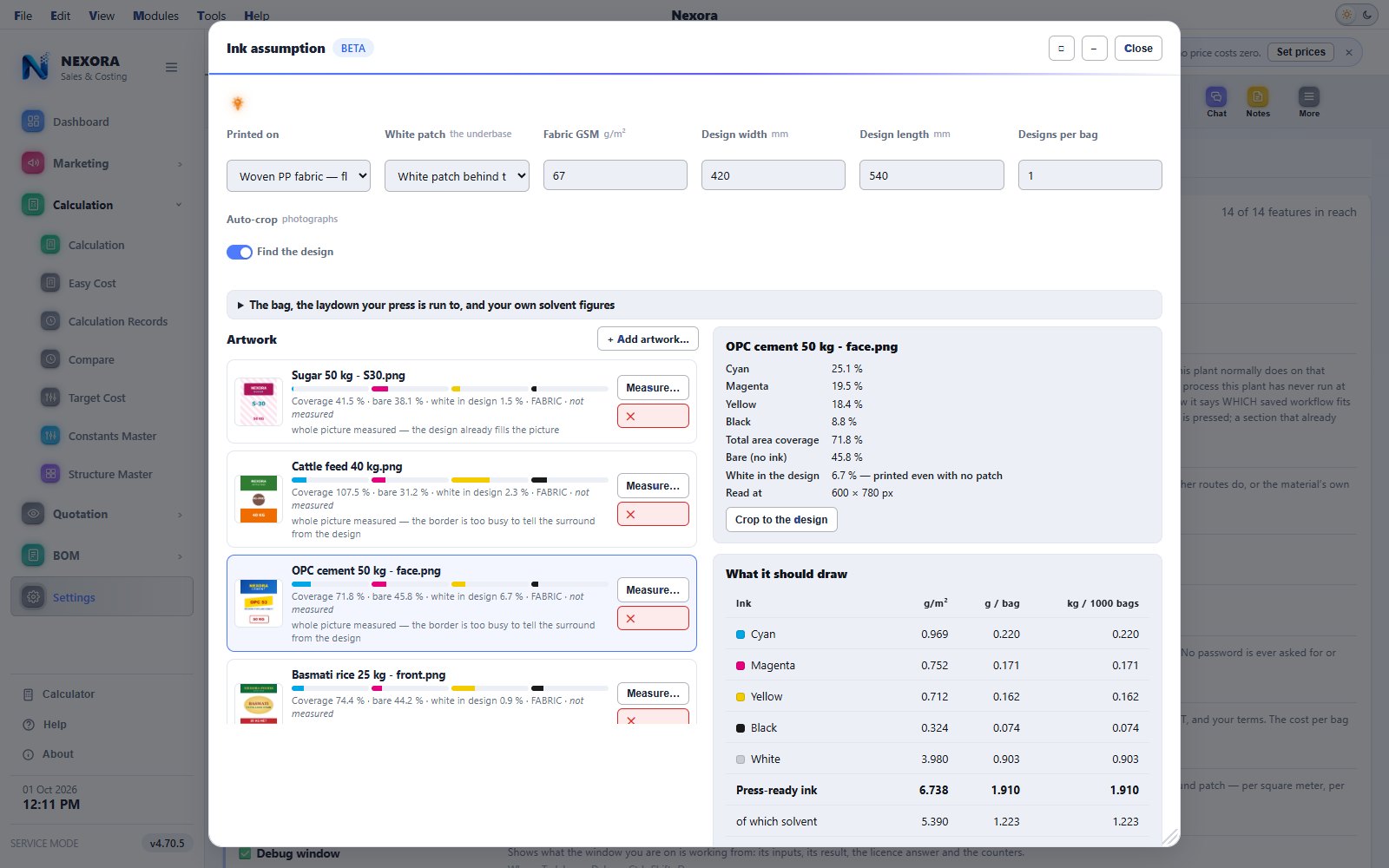
Four figures, not a guess
Ink and solvent per square metre, per bag, per 1,000 bags and per kilogram of fabric or film. Add them to the BOM section as ordinary lines in kilograms per 1,000 bags and they cost like any other material.
White, three ways
No white, a patch behind the artwork only, or a flood white over the whole face. On a half-covered design the flood costs exactly twice the patch, and the line says which it is. GSM and micron carry the substrate effect.
It learns your press
Until it is trained, the figures come from published trade practice and the window says so. Record what a job actually drew and train: ten jobs make it worth trusting, a hundred make it good, and it reports WEAK, FAIR or GOOD so you know which you have.
Your artwork never leaves the plant
The image stays on your computer. What crosses the wire is four coverage fractions, a white share, a substrate and a size — a few hundred bytes, from which no image can be rebuilt. One company can never read or overwrite another's model. Each coefficient reads as a sentence a print manager can check: we lay 3.1 grams of cyan per square metre at full coverage.
Every gram traced back to the formula that produced it
The calculation screen splits the bag into components and shows the full traceability chain beside it — cut length, body width and length, area, base-fabric weight, denier, UL GPM and LAMI GPM. Click any field to see how the value was derived.
- Component-wise breakdown with share of total bag weight
- GSM quick-adjust stays pinned while you scroll, recalculating live
- What-if analysis tests a change without touching the saved calculation
- Target / minimum / maximum weight with tolerance and wastage
- ✦ Nexora AI — say the bag and ask for the cost; it shows the steps (calculation, route, BOM, recipes, check, cost) and one Run does them. “70 gram” is the target weight: Nexora finds the GSM


A new price never overwrites the old one
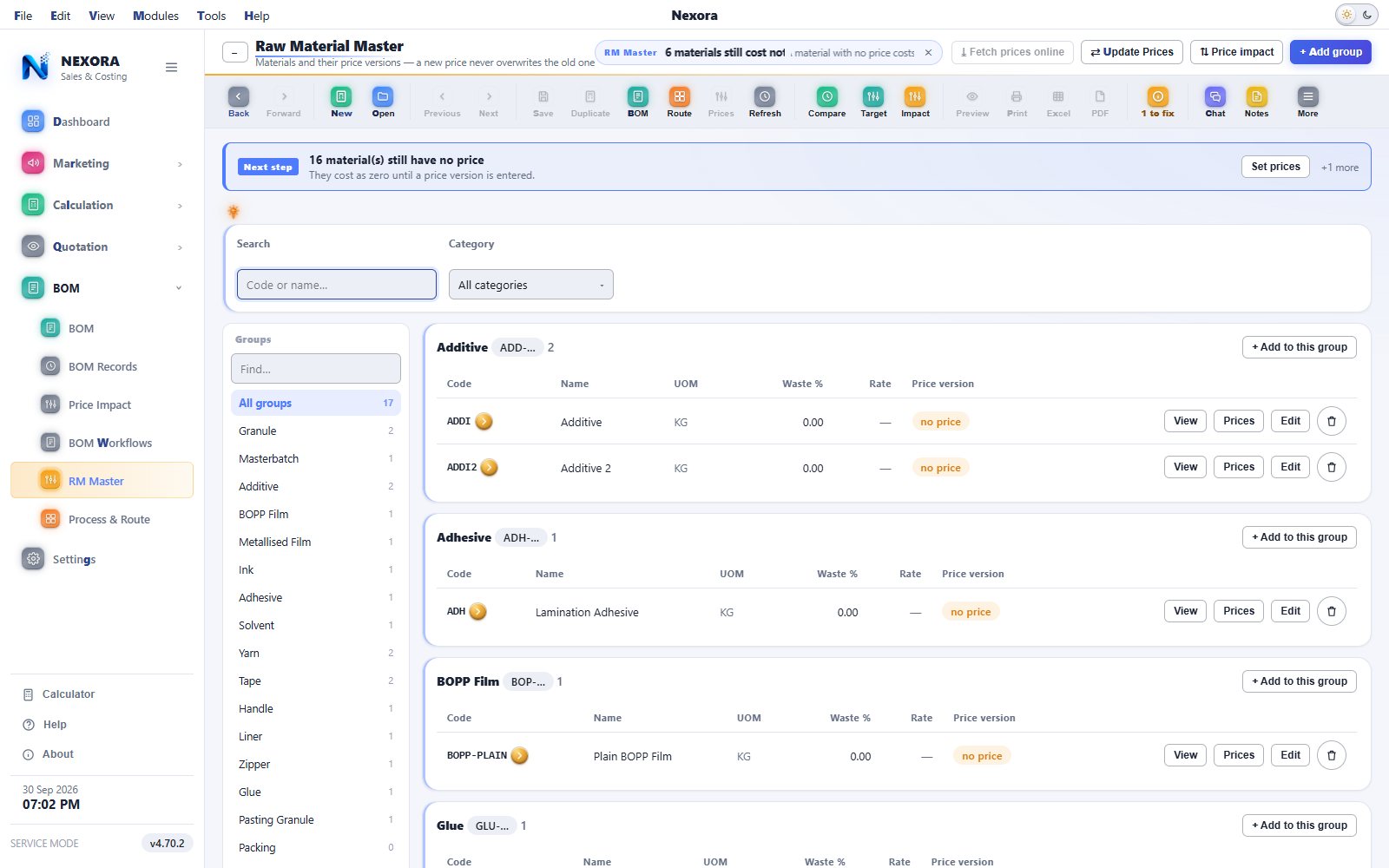
Materials sit in groups — granule, masterbatch, BOPP film, ink, adhesive, handle, liner — and each keeps a versioned price history with effective-from dates. A resin rate change can never silently rewrite a locked production batch.
- Price versions with effective-from dates and notes
- Excel-like bulk price update when the market moves
- "Used in" shows every route and step that consumes the material
- Default waste percentage held against the material itself
- Fetch prices online from a producer's published list, once a day on its own, and the BOM records where each price came from
- A material's price can follow another material, so a grade that always runs at a fixed difference stays in step
Build the route the way the plant actually runs
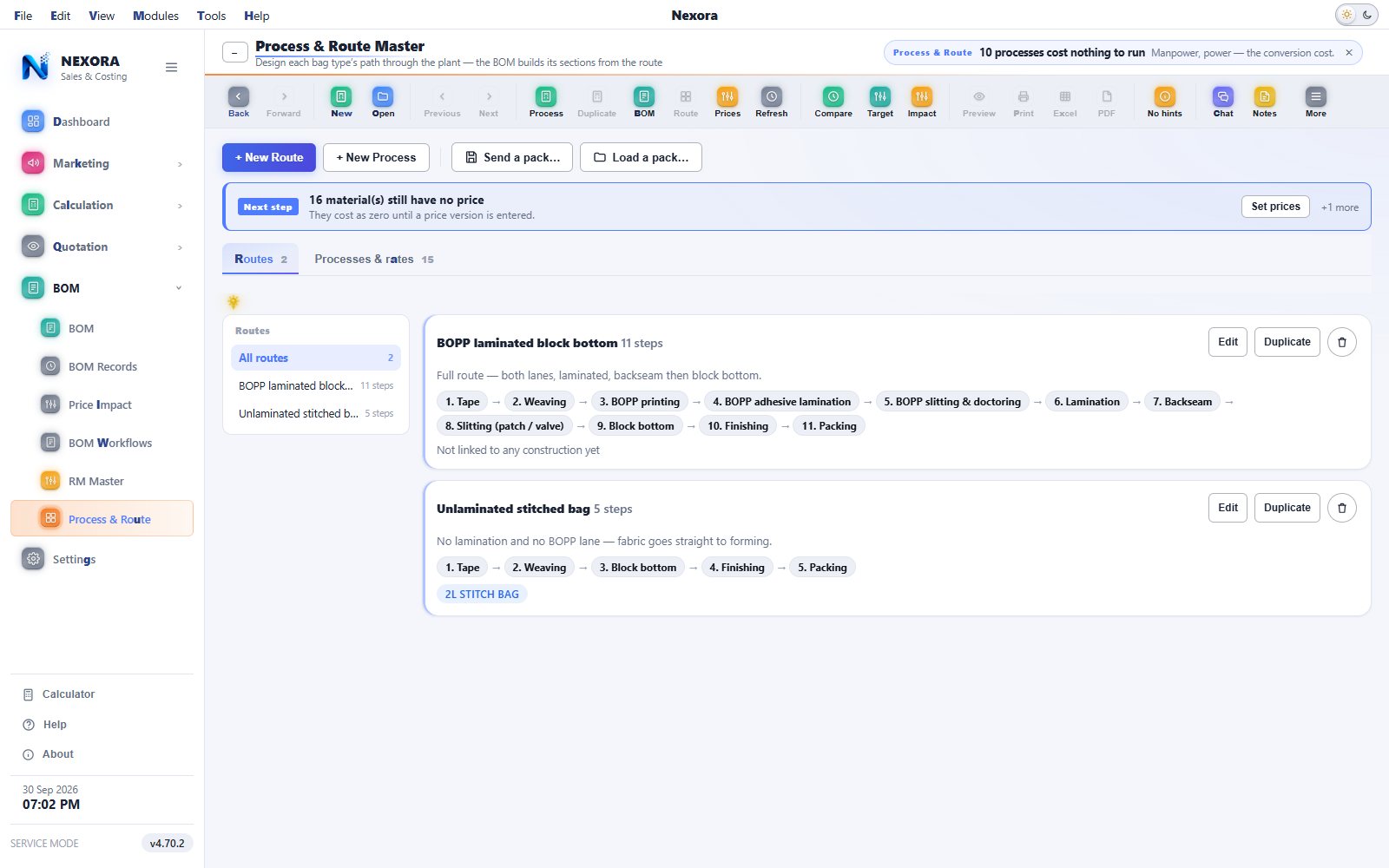
Drag processes into order — tape extrusion, weaving, lamination, flexo printing, cutting, stitching, finishing, segregation, packing — and each step declares what it consumes and produces. Resource rates (manpower, electricity, machine) are held per process as cost per kilogram.
- A bag that skips lamination is simply a shorter route, not a code change
- A sense check warns when a step expects something no earlier step produces
- Component-wise BOM: body, patch and liner can each run their own route
- Saved workflows: set the recipe up once, load it on the next bag of that construction
- Every money figure also shown per kilogram, so a rate can be sanity-checked at a glance
Material plus conversion, reconciled to the rupee
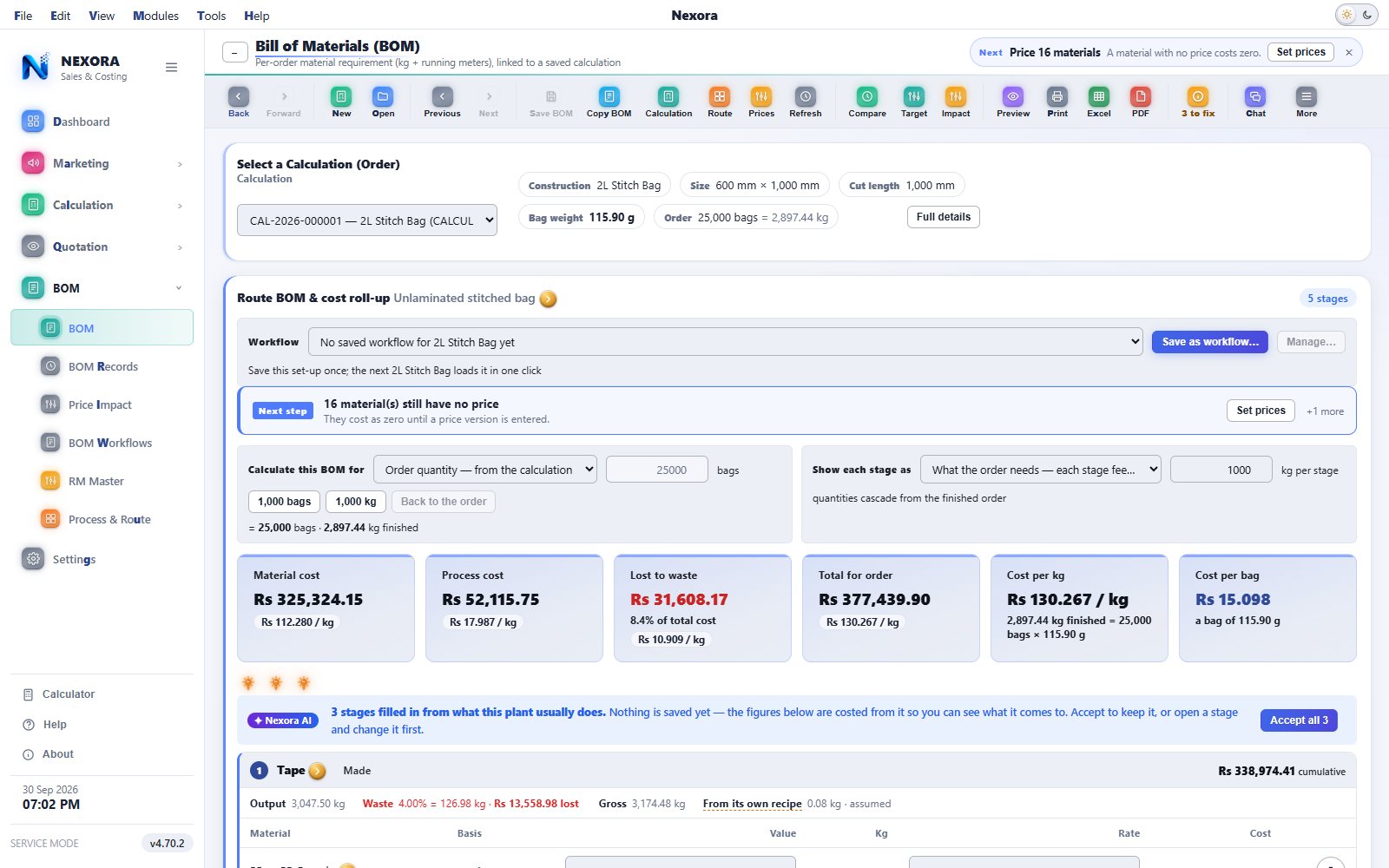
The BOM turns a saved calculation into a per-order material requirement — kilograms and running metres — with material cost and conversion cost rolled up separately and then proved against each other. Waste is carried forward, never credited back: scrap is still paid for.
- Material, conversion, total and cost per bag as four live figures
- Process-level conversion cost with % of total
- A green reconciliation line confirms the BOM matches the roll-up exactly
- Print, PDF and Excel export of the calculation sheet and BOM
Every window, two or three keys away
A Modules menu on the menu line opens every module group onto its windows. Every action, tab and window has one letter in bold: press Alt and the letter, or Alt and then the letters one after another — Alt, M, C, R opens Calculation Records. People who come from SAP Business One find the keys where they expect them.
- The access letter is bold in the theme colour and never used twice on the same window
- The arrow keys work in every menu
- The mouse still does everything


The calculation sheet your QA and supervisors sign off on
Every approved calculation prints as a standardised sheet — item, construction, technical spec, weight breakdown and tolerance band. Below is a sample.

| Customer: Sample Cement Ltd | Item: 20 kg cement bag | Construction: 2L Block Bottom |
Technical specifications
| Width: 500 mm | Length: 600 mm | Patch depth: 100 mm |
| Valve depth: 150 mm | Mesh warp: 32 | Mesh weft: 32 |
| Body fabric: 63 g/m² | Body coating: 23 g/m² | Patch fabric: 61 g/m² |
Weight breakdown
| Component | Weight (g) | % share |
|---|---|---|
| Body (fabric + coating + BOPP + metallised) | 62.68 | 83.1% |
| Top patch | 4.43 | 5.9% |
| Bottom patch | 4.17 | 5.5% |
| Valve strip | 4.18 | 5.5% |
| Total bag weight | 75.45 | 100.0% |
The costing walks out of the plant as a quotation
A costing that stops at the costing still leaves somebody retyping it into a spreadsheet. Nexora carries it one step further, onto your own letterhead.
Several items, one sheet
A quotation is a table of rows. Three sizes, or the same sack in two GSMs, or a plain sack beside its BOPP version — each row its own construction, quantity and rate, totalled on one sheet. A row can also carry a bought-out item with no calculation behind it, so the sheet the buyer receives is complete.
Does this row make money?
Each row carries its own profit or loss against the costing behind it, and the quotation carries its profit before tax. A row that is under water shows while you are still typing, not in a review after the order has run. Freight, packing and any other charge sit on their own lines, so the bag rate stays the bag rate.
Your letterhead, your terms
The sheet prints in your house style with your own terms and conditions. The construction drawings stay on the calculation sheet inside the plant — a quotation is a commercial document and nothing on it needs to show a buyer how the bag is built.
Out by mail or WhatsApp
One button on the task bar, configured once under Settings → Company. In this industry the quotation reaches the buyer on WhatsApp more often than by any other route.
The same Nexora in the pocket of the people away from the desk
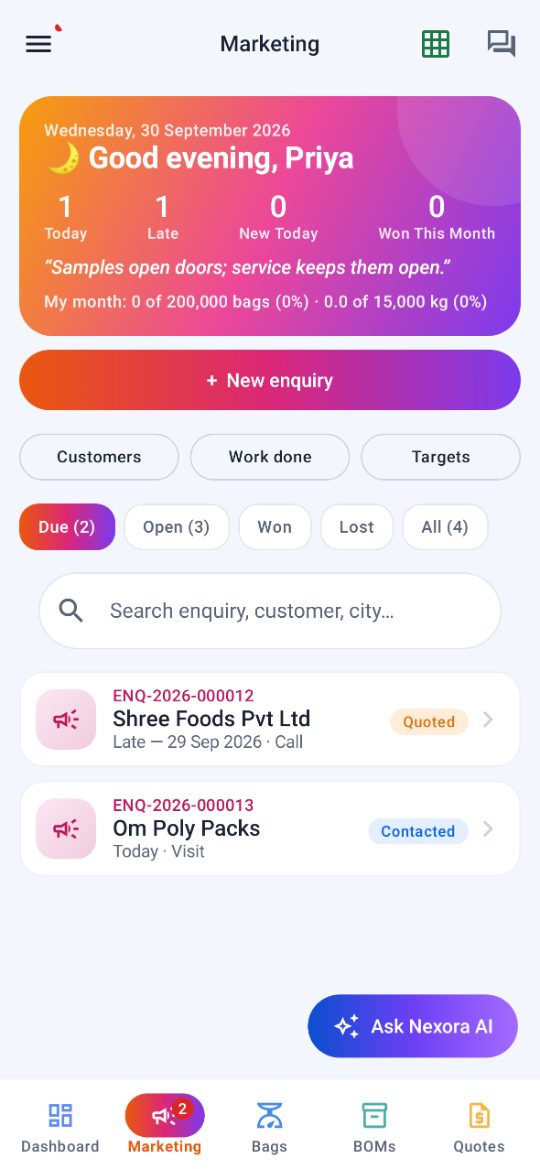
The Android app is for the plant’s people who are out with buyers or on the floor. Each phone is approved by your administrator before it opens the company.
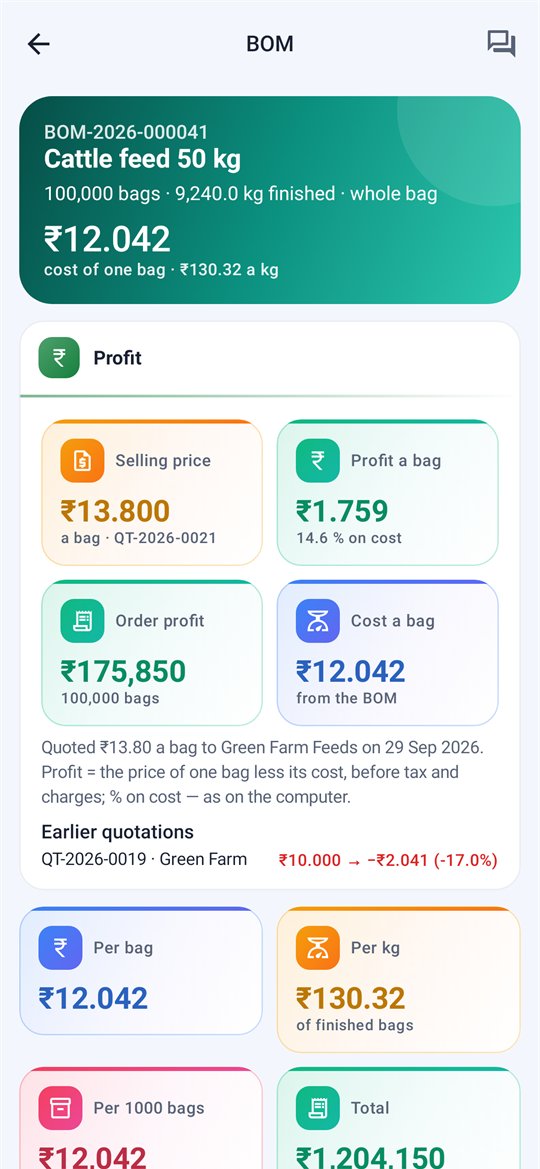
- Dashboard with tiles and charts, and a morning briefing on the first opening of the day
- Marketing: enquiries, customers, and follow-ups with call, WhatsApp or SMS and a reminder
- Bag calculations, BOMs in full with the 3D bag view, and quotations as a PDF to WhatsApp
- Nexora AI, the company chat with search, and quick alerts
- For the administrator: approve phones, and set the users and the features they get
What has shipped since the 3D view
Nexora ships weekly. These are the changes a plant actually notices.
4.70 — Keys like SAP Business One
A Modules menu on the menu line, a bold access letter on every action, tab and window, and Alt then letters one after another (Alt, M, C, R opens Calculation Records). Excel export is for administrators only. The company chat searches and lights every match, with Mark all read. Screenshots on the phone app are a permission the administrator gives.
4.69 — Nexora Sales & Costing
The product takes its new name. The Dashboard has two tabs, Calculation and Marketing, with charts that draw themselves. A morning briefing greets each person with the day’s follow-ups. A customer holds many contacts, many addresses and its sub companies.
4.68 — Marketing
Enquiries, one per buyer requirement, each with its own number. Follow-ups with the next date and time and a reminder, work done per person, monthly targets in bags and kilograms counted on won enquiries only, and sources added with an approval.
The denier is the physical one
Denier now comes from GSM × 228.6 ÷ (warp mesh + weft mesh), so a 70 GSM 10 × 10 fabric reports the 800 denier tape that is actually in it. The old formula reported 3070. The weight never depended on it — denier is a reporting figure — and the factor sits in the Constants Master for a plant that allows for crimp. The converters on this site use the same formula.
Mesh counted the way you count it
Per inch, per centimetre or per 10 cm, chosen under Settings → Units. The forms, the figures, the printed sheets, the quotation and the calculator all follow it. Underneath, Nexora always stores tapes per inch, so the setting is a lens and nothing saved changes when you switch.
Calculate by weight
Type the bag weight you have been asked to hit and get the GSM and the GPM that reach it, instead of guessing a GSM and checking what it weighs. The specification and the strip agree in both directions.
Register your plant yourself
A company registers from the activation window — no email thread, no waiting. The demo starts immediately and the licence is attached to that company when you are ready.
One seat, one person
The Users & Access card says whose seat is whose, and a person who has left can be removed to free their seat for somebody else. Your administrator owns that list.
Help you can search
A help window with a search box, and a guided tour that covers the whole application rather than one screen. New staff stop being a phone call.
Units a plant measures in
Settings → Company → Units sets the length unit the plant thinks in. Saved data never changes — the unit is how figures are shown and taken, not how they are stored.
Delete, with a password
A record can be removed from the History row or its right-click menu — administrators only, one password, every time. Numbers that cannot be right are refused at entry rather than saved and found later.
A dashboard that opens first
The Dashboard is the first thing you see and it is live: what is wrong, what is waiting, and the whole of the last day. Every constant says where it is used, saves on purpose, and can be reset to the factory value one at a time or all at once.
One engine, two ways to run it
The company is the licence: one key, as many seats as you need, one clock. Extend the company and every machine extends with it.
For plants and customers
Weight calculation on every seat, costing and BOM served by the Nexora costing service, licence console for your admin, optional offline allowance set per company.
- One company key, N machines, one expiry
- Each person signs in with their own name and PIN, on any seat, and works offline once they have
- Masters shared across the company; your administrator decides who sees everyone's calculations and who sees only their own
- Optional parts switch on and off per installation: Nexora AI, the 3D view, BOM workflow automation, online prices, the calculator and the debug window
- Nexora Mobile on Android for the people away from the desk, each phone approved by your administrator
- Only counts and minutes leave the plant — never a calculation, material, price or name
- Expiry is read-only, never a shutdown: everything saved still opens and prints
7-day demo on your own PC
Install, skip the key, and you get a private single-seat demo company for seven days — real engine, real screens, your own bag specs.
- Windows desktop application, local-first data
- Backup and restore of all masters and calculations
- We walk you through your first construction on a call
Frequently asked
Does it work offline on the shop-floor PC?
Yes. Nexora Sales & Costing is an offline-first Windows desktop application. Data lives on the machine, with backup and restore. The licensed edition checks in with the licence service and can be granted an offline allowance per company.
Can I edit the constants and formulas?
The Constants Master is yours to edit, with per-construction overrides, and the Formula Traceability card shows every formula on screen by design. The engine itself is locked so every machine gives the same answer.
How does it handle a resin price change?
A new price is a new version with its own effective-from date. Approved calculations keep the rate they were costed at; new ones pick up the new rate. Bulk update is Excel-like when the whole market moves.
Which bag constructions are covered?
29 standard structures: plain and printed PP/HDPE woven sacks, BOPP laminated, block bottom, pinch bottom, valve, liner, handle, backseam and easy-open variants, each with its own field set and weight logic. New constructions can be added as structures, not code.
Can more than one person use it in the same company?
Yes. Each person signs in with their own name and PIN on any licensed seat. Materials, prices, processes and routes are shared company-wide and the latest save wins by the server's clock, while calculations stay private unless your administrator grants wider access.
Is there a phone app?
Yes. Nexora Mobile on Android carries the dashboard, Marketing with enquiries and follow-ups, bag calculations, BOMs with the 3D bag view, quotations as a PDF to WhatsApp, Nexora AI and the company chat. Each phone is approved by your administrator, who also sets the users and the features they get.
What is the 3D bag view for?
It draws the bag your specification describes so a wrong patch depth or valve size is visible at a glance, and it breaks the bag into parts with a size, weight and share against each. See the recording above.
How does the ink assumption work, and is my artwork safe?
Nexora reads the artwork on your own computer and works out the coverage of each colour. Only those coverage figures, the white share, the substrate and the size are sent for the calculation — never the image, and never to another company's model. Untrained it uses published trade practice; trained on your measured jobs it uses your own press.
Can I send a quotation to a buyer from it?
Yes. A finished calculation becomes a quotation on your own letterhead — several items on one sheet, freight and packing as their own lines, your own terms and conditions, the profit before tax visible while you type, and the sheet out by mail or WhatsApp in one click. See the quotation module.
Which denier formula does the engine use?
Denier = GSM × 228.6 ÷ (warp mesh + weft mesh), the physical denier of the tape in the fabric. A 70 GSM 10 × 10 fabric reports 800 denier. The factor is a constant you can edit if your plant allows for crimp, and the bag weight does not depend on it — denier is a reporting figure. The free converters here use the same formula.
Is this the Nexora ERP?
Nexora Sales & Costing is the enquiry, calculation and costing module that the wider Nexora ERP is built around. Masters created here — materials, prices, processes, routes — carry into the ERP modules.
See it run on your own bag spec
Send a spec sheet and get the full weight & cost break-up back within one business day.